- Commissioning
- Connect devices
- Charger max
Charger max
Compatibility
| EnergyManager Pro | Manager flex 1.0 / flex 1.5 / rail | |
|---|---|---|
| Charger max |
|
|
| Recommended firmware version: 1.5 or higher | ||
| Full Compatibility |
| No compatibility |
Maximum number of actively controlled EV chargers in the energy management system
| EnergyManager pro | Manager flex 1.0 / flex 1.5 / rail | |
|---|---|---|
| Charger max | 0 | 3 devices (including different brands) |
NOTE:
- The optional load balancing feature of the Charger max currently works only when a Charger max is installed on the SOLARWATT Manager
Installation and Configuration
Interface: Ethernet
Related Documents
Online User Manual: SOLARWATT Charger max
- Enable Modbus via the app
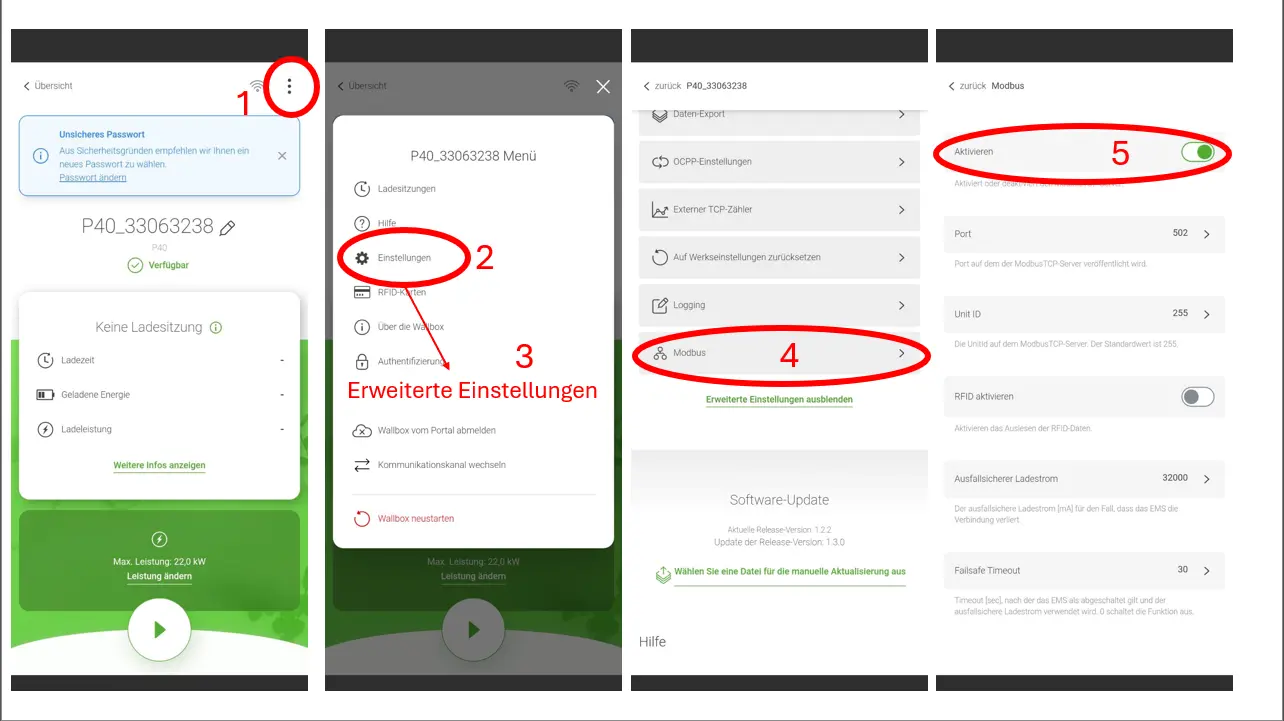
Configuration in SmartSetup
Search for devices
Add Charger max driver to search
To integrate the Charger max into the SOLARWATT Manager, it must be on the same network as the SOLARWATT Manager. The Charger will be automatically detected on the network, and the corresponding drivers and the device itself will be installed.
Optional:
An explicit search is not necessary, but it is possible. To do this, select the driver, start the search, and complete the rest of the setup process.
To do this, click on the search box in the "Search for Devices" section and search for "max." The Charger max will be among the results.
You will be asked whether the system should search for devices automatically or if you would like to enter the IP address or host name. By default, automatic installation is recommended. Use the IP address or host name if, for example, there are multiple devices on the network and only one of them is to be installed.