- SOLARWATT Battery & Inverter vision
- Planning
- Inverter vision three 3-phase grid
Inverter vision three 3-phase grid
click on '+' for the table of contents
General planning information
These Notes apply to all of the following application examples for Inverter vision three
Dimensioning information for inlets and outlets Inverter vision three
Terminals in the Inverter vision three connector plug are suitable for conductor cross sections of up to 10 mm².
The following cable lengths can be realized using 5x6 mm² and 5x10 mm² as an example and taking into account the permissible voltage drop for PV generators [1 %] and consumers [3 %, calculated here proportionally with 2 %]:
Overview for generators - 1 % voltage drop
| Power class Inverter [kW] | Length [m] for Conductor cross section 6 mm² | Length [m] for Conductor cross section 10 mm² |
15 | 16 | 28 |
12 | 20 | 35 |
10 | 25 | 42 |
8 | 31 | 53 |
6 | 41 | 70 |
5 | 49 | 84 |
Overview for consumers - pro rata 2 % voltage drop
| Power class Inverter [kW] | Length [m] for Conductor cross section 6 mm² | Length [m] for Conductor cross section 10 mm² |
15 | 34 | 59 |
12 | 43 | 74 |
10 | 51 | 88 |
8 | 64 | 111 |
6 | 86 | 147 |
5 | 103 | 178 |
Line protection for inverter supply line and backup output when using 6 mm² or larger: 3-pole, maximum 32 A, C characteristic
Attention! This information is intended as a dimensioning aid and is based on certain assumptions regarding the type of installation (B2), number of cables (2) and ambient temperature (30 °C). The suitability of the recommended cables must always be checked on the basis of the specific conditions.
When using a Battery vision three backup booster
- only a cable with a maximum conductor cross section of 6 mm² can be used for the backup output of the Inverter vision three (limited by the maximum terminal size in the backup booster)
- the line protection for the inverter supply line and the backup output is built into the Battery vision backup booster (32 A, C characteristic).
Residual current circuit breaker (FI/RCD)
Installing a fault current circuit breaker upstream of the inverter is optional and primarily depends on the country-specific specifications or local requirements (e.g. individual fire protection specifications) for the use of fault current circuit breakers.
If a fault current circuit breaker is installed, the breaker must have a rated residual current of at least 300 mA.
This planning area provides circuit diagrams for each planned system constellation, which also contain the optional residual current circuit breakers.
Decision support for using the Inverter's backup output or using the Battery vision backup booster
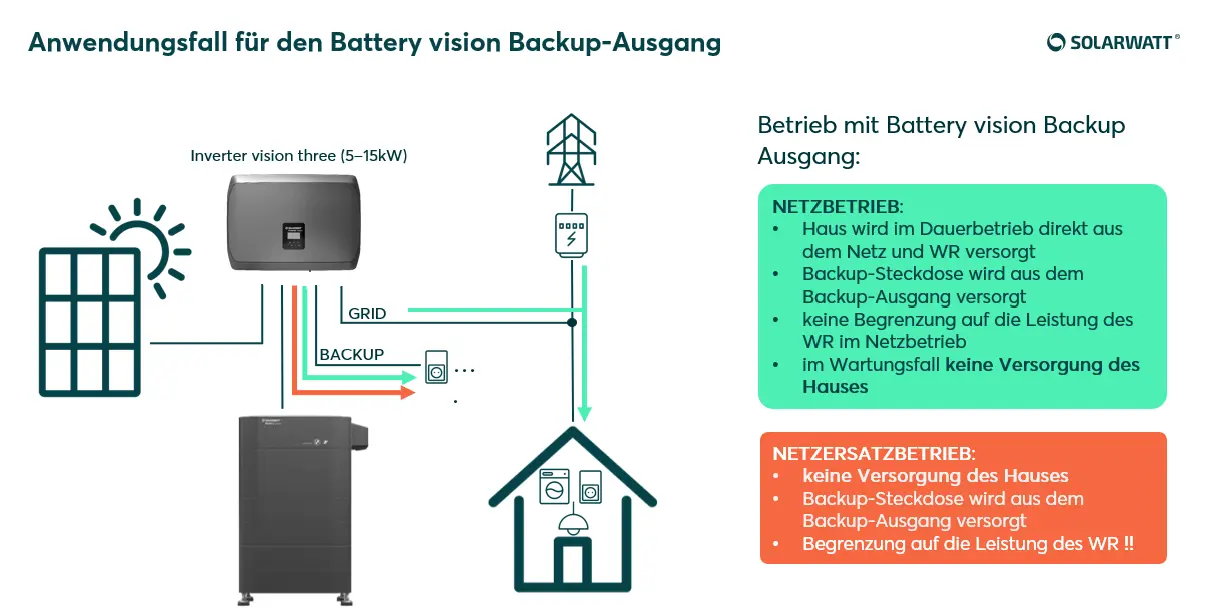
Consumers or an entire household connected via the backup output of the Inverter vision are operated in regular grid mode as well as in backup mode with the output power of the selected Inverter vision specified in the data sheet of the Inverter vision three under the heading "Backup power". The value corresponds approximately to the power class of the selected inverter, i.e. a 10 kW device can also provide 10 kW via the backup output, but it should be noted that a maximum of 1/3 of the total power can be provided per phase.
Taking this condition into account, a decision must be made as to whether the system should be equipped with the additional component Battery vision backup booster. This component makes it possible to supply the connected loads or an entire household with the available house connection power during regular grid operation. In Backup mode, the power is also limited to the above data sheet specification in this variant.
Backup output
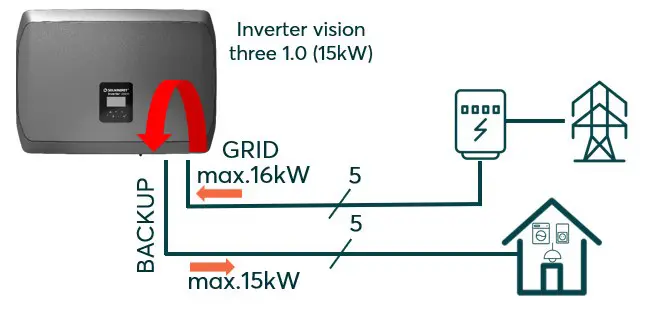
Backup mode directly from the backup output of the Inverter vision
Backup mode directly from the backup output of the Inverter vision makes sense if:
- the planned household is sufficiently supplied with up to max. 15kW of power and an Inverter vision three 1.0 (15kW) can be used
or
- only one or two larger loads (e.g. EV Charger and heat pump) would break through the power limitation and these are separated in the main distribution board as devices not supplied with emergency power
or
- The customer only wants to supply a few selected circuits in the event of a power failure, which are connected via the backup output
or
- The customer only wants an emergency power socket, which then provides energy for individual consumers in both regular and Backup mode
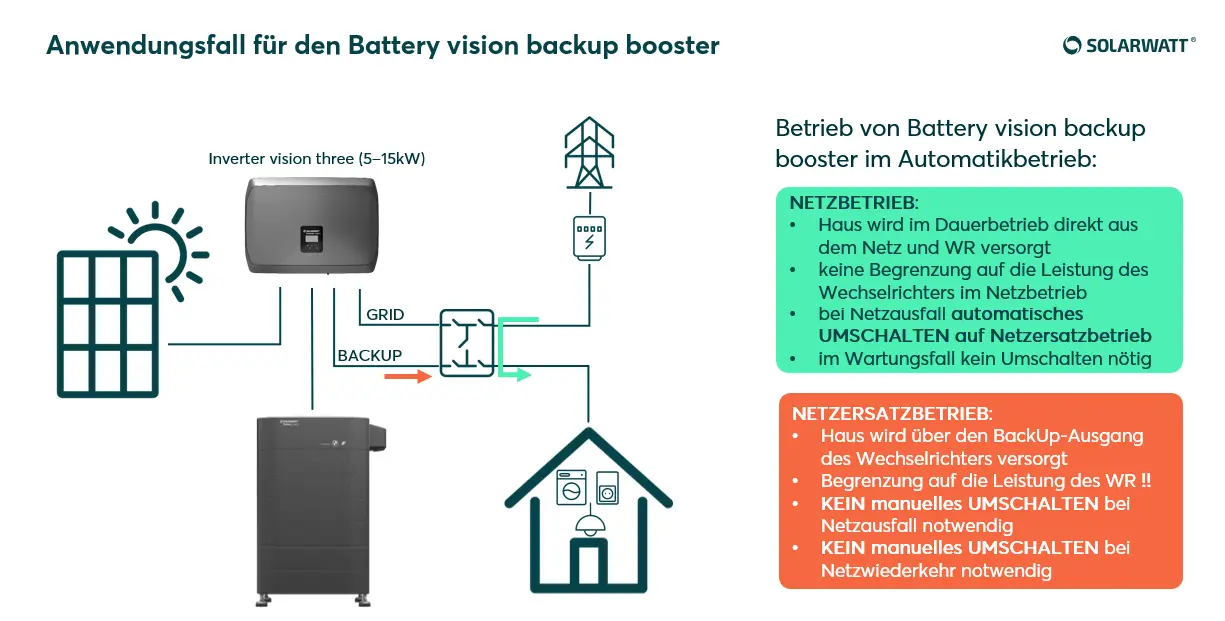
Backup booster
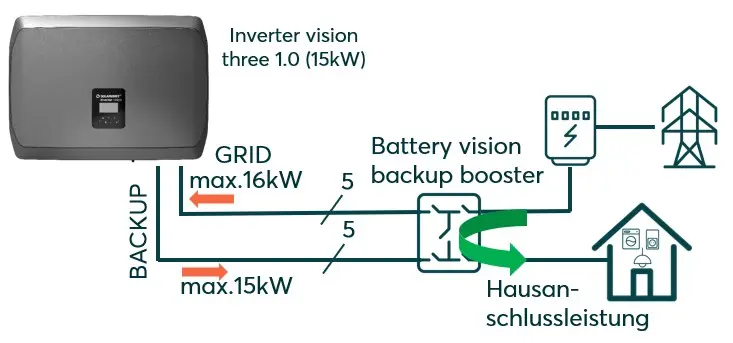
Backup mode with use of the Battery vision backup booster
Backup mode with use of the Battery vision backup booster:
- can provide the available house connection power to the connected household in regular mains operation, the inputs and outputs of the Battery vision backup booster provided for this purpose are fused with 63A
- can provide the output power of the selected Inverter vision in Backup mode as specified in the Inverter vision three data sheet under the heading "Backup power", up to a maximum of 1/3 of the total power per phase
- does not provide a separate outgoing terminal for loads within the backup booster that are not supplied with emergency power. These loads, if present, must be blocked by suitable measures in Backup mode.
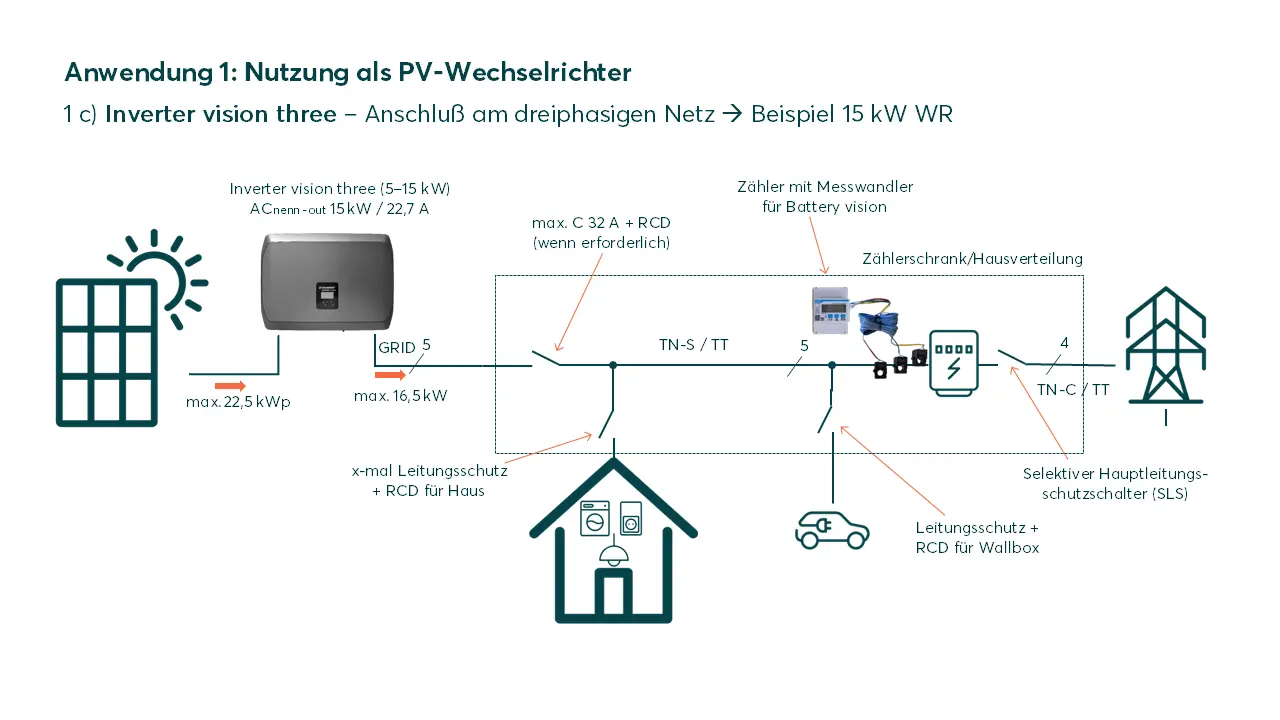
PV INVERTER
Using the Inverter vision three as a PV inverter
The Inverter vision three can be operated as a PV inverter without connecting a battery. This can be useful if, for example, the battery is to be retrofitted at a later date.
In this configuration, self-consumption can only be optimized by switching on controllable loads when there is a PV surplus.
Important settings in the SOLARWATT Manager EM.Setup:
In order to be able to display the total energy balance in the SOLARWATT Manager portal and the SOLARWATT Home app and to optimize controllable loads, the Chint-Meter (included in the scope of delivery) and a SOLARWATT Manager (separate accessory) must be installed.
Important settings during commissioning:
Additional settings when installing Inverter vision three without a battery
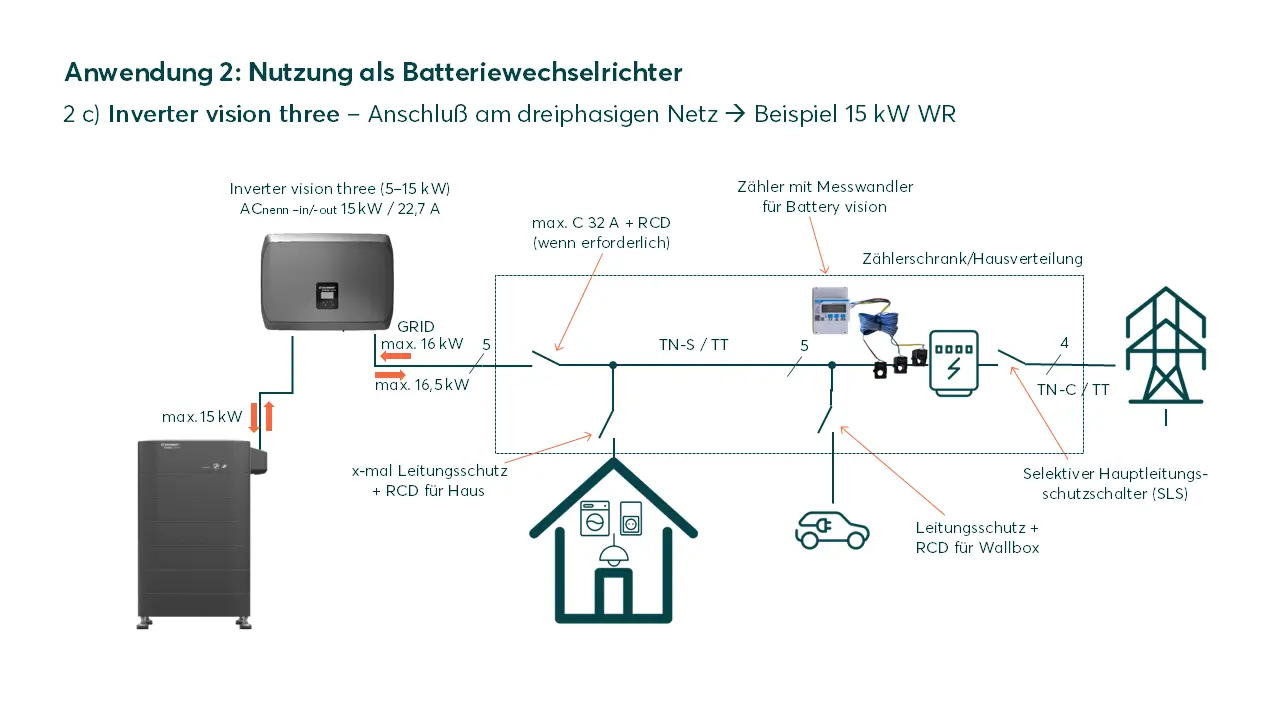
Battery inverter
Using the Inverter vision three as a battery inverter
The Inverter vision three can be operated as a battery inverter with a Battery vision between 3 and 7 packs (7.8 - 18.2kWh) without connecting a PV plants. This can be useful if, for example, the battery is used to optimize electricity costs using dynamic tariff models ("time of use") or is integrated into an energy system to shift peak loads ("peak shaving").
The installation of the chint meter (included in the scope of delivery) and a Manger flex or Manager rail (separate accessory) is required for the applications mentioned.
Note on the configuration of such a system in the SOLARWATT Manager:
- for correct balancing of the system, it is mandatory to create a PV plants, which in this case must be created with 0kW power. Further information on configuring the SOLARWATT Inverter vision in the SOLARWATT Manager can be found in the Manager online manual
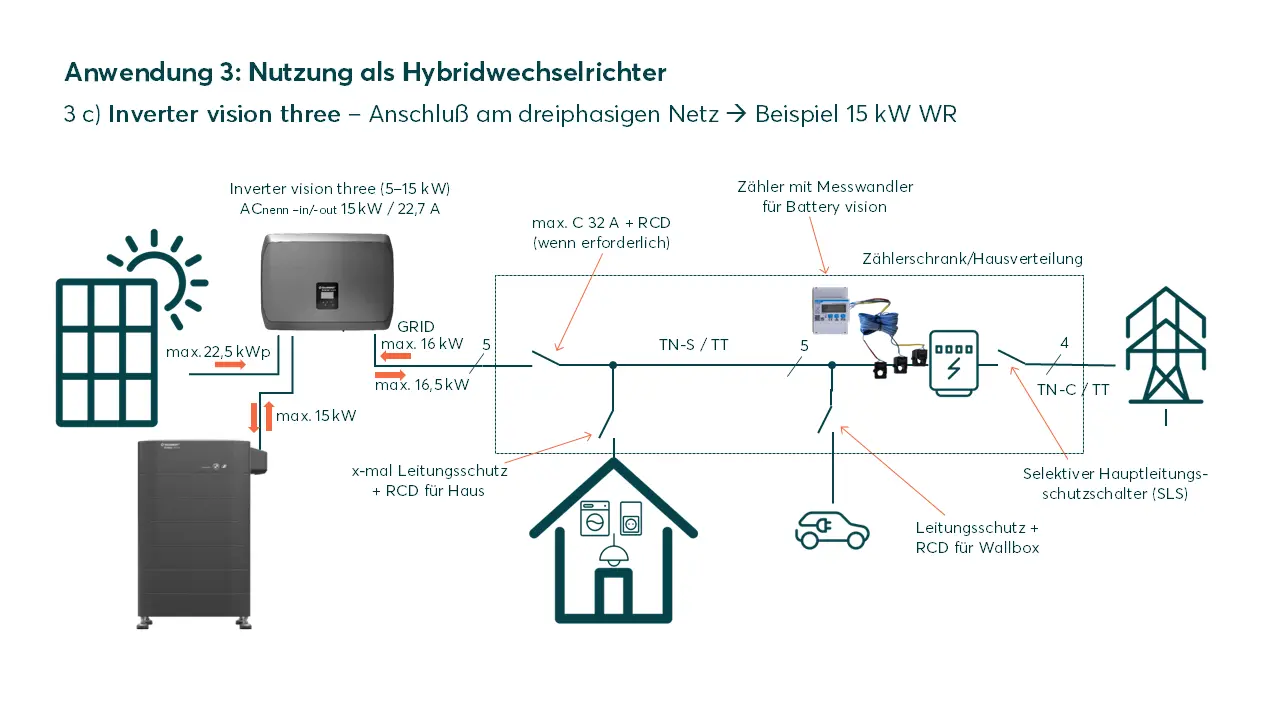
Hybrid inverter
Using the Inverter vision three as a hybrid inverter
The Inverter vision three with connected PV plants and a Battery vision between 3 and 7 packs (7.8 - 18.2kWh) is the classic application of the device as a hybrid inverter. It is the most sensible solution for achieving the highest possible degree of self-sufficiency for a domestic energy supply.
For the further solar optimization of individual consumers up to the heat pump and/or the charging of the electric vehicle, the SOLARWATT Manager flex or Manager rail as a separate accessory is the "must have" addition to the system.
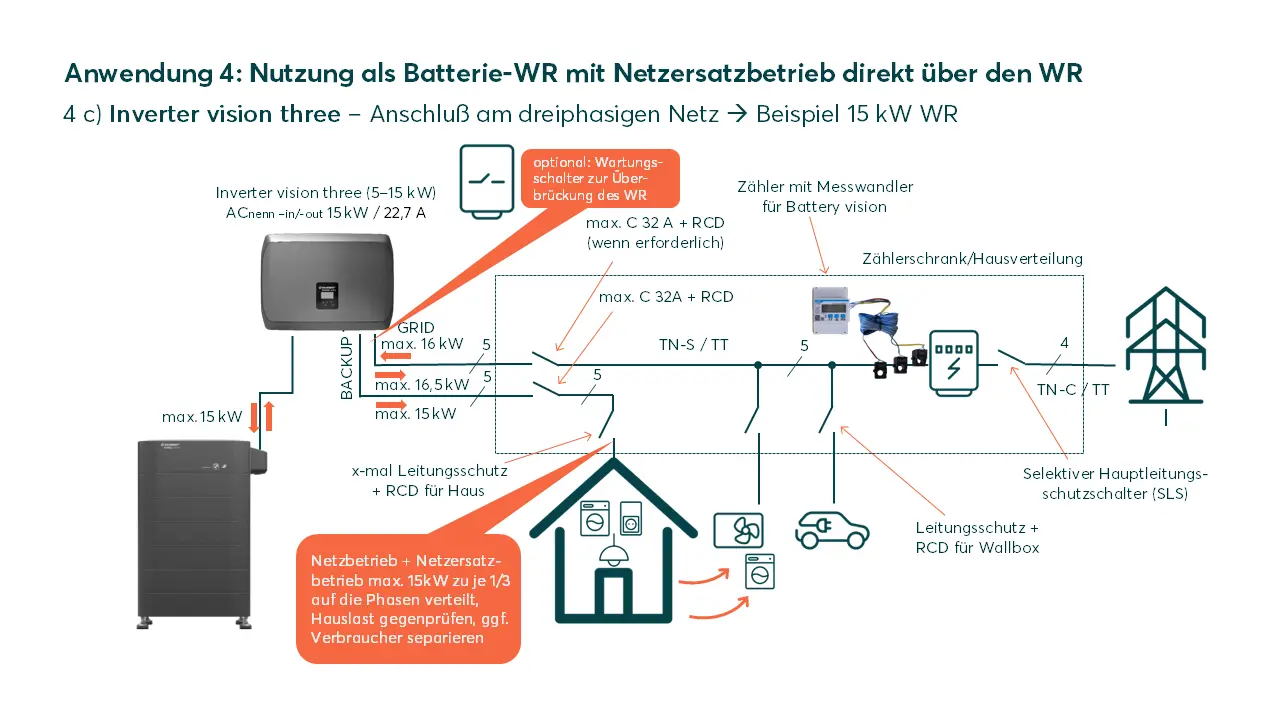
Battery inverter (NEB* via inverter)
Use of the Inverter vision three as a battery inverter including Backup mode (NEB)
In addition to the applications for the battery inverter from variant 2, consumers or an entire household can continue to be supplied with power even in the event of a mains failure. The variant described here is designed without the Battery vision backup booster; the mains 0 - emergency power changeover switch (or maintenance switch) can be installed as a useful addition; the advantage of this accessory component is explained in the general planning information.
It is essential to pay attention to the maximum power of the loads connected to the backup output of the inverter! This must not be exceeded, neither in total power nor per phase (1/3 of the total power). Attention: this applies both in grid operation and in Backup mode.
Note on the configuration of such a system in the SOLARWATT Manager:
- for a correct balancing of the system, it is mandatory to create a PV plants, which in this case must be created with 0kW power. Further information on configuring the Inverter vision in the SOLARWATT Manager can be found in the Manager's online manual
Hybrid inverter (NEB* via inverter)
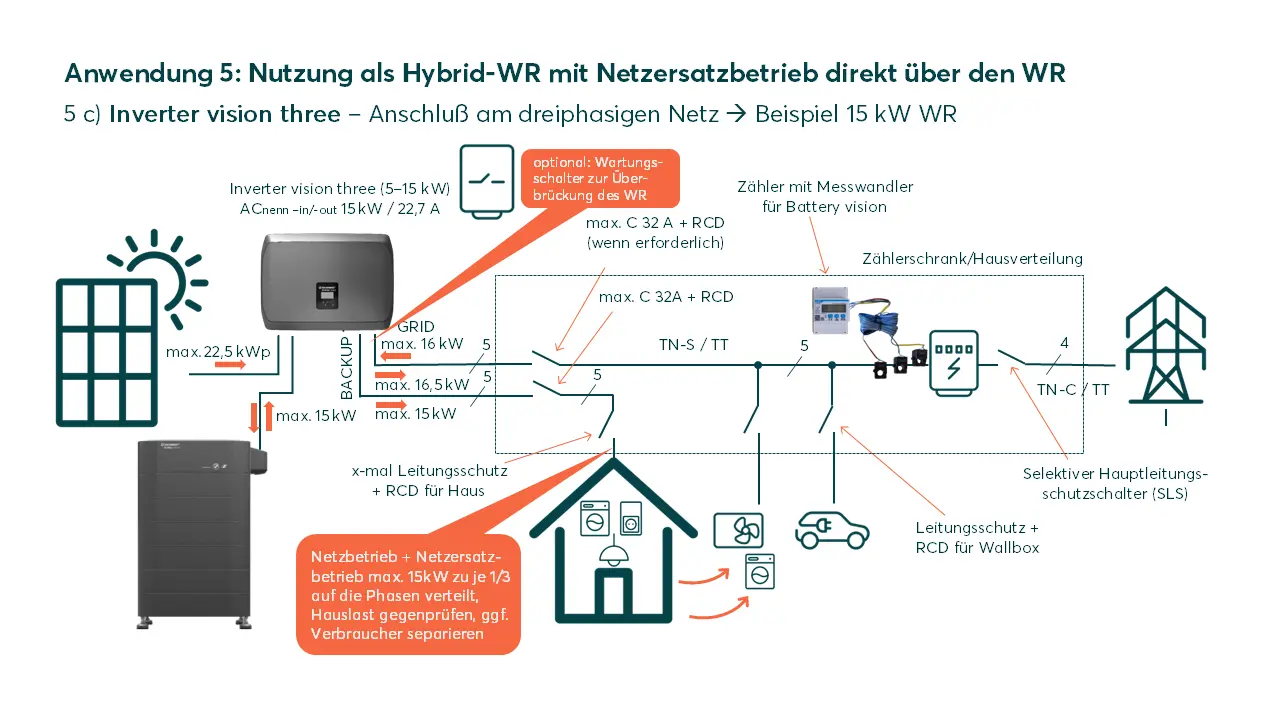
Use of the Inverter vision three as a hybrid inverter including Backup mode (NEB)
In addition to the hybrid inverter application described in variant 3, consumers or an entire household can continue to be supplied with power even in the event of a mains failure. The variant described here is designed without the Battery vision backup booster; the grid 0 - emergency power changeover switch (or maintenance switch) can be installed as a useful addition; the advantage of this accessory component is explained in the general planning information.
It is essential to pay attention to the maximum power of the loads connected to the backup output of the inverter! This must not be exceeded, neither in total power nor per phase (1/3 of the total power). Attention: this applies both in grid operation and in Backup mode.
For further solar optimization of individual loads up to the heat pump and/or charging of the electric vehicle, the Solarwatt Manger flex or Manager rail as a separate accessory is the "must have" addition to the system.
Battery inverter (addition to existing PV plants)
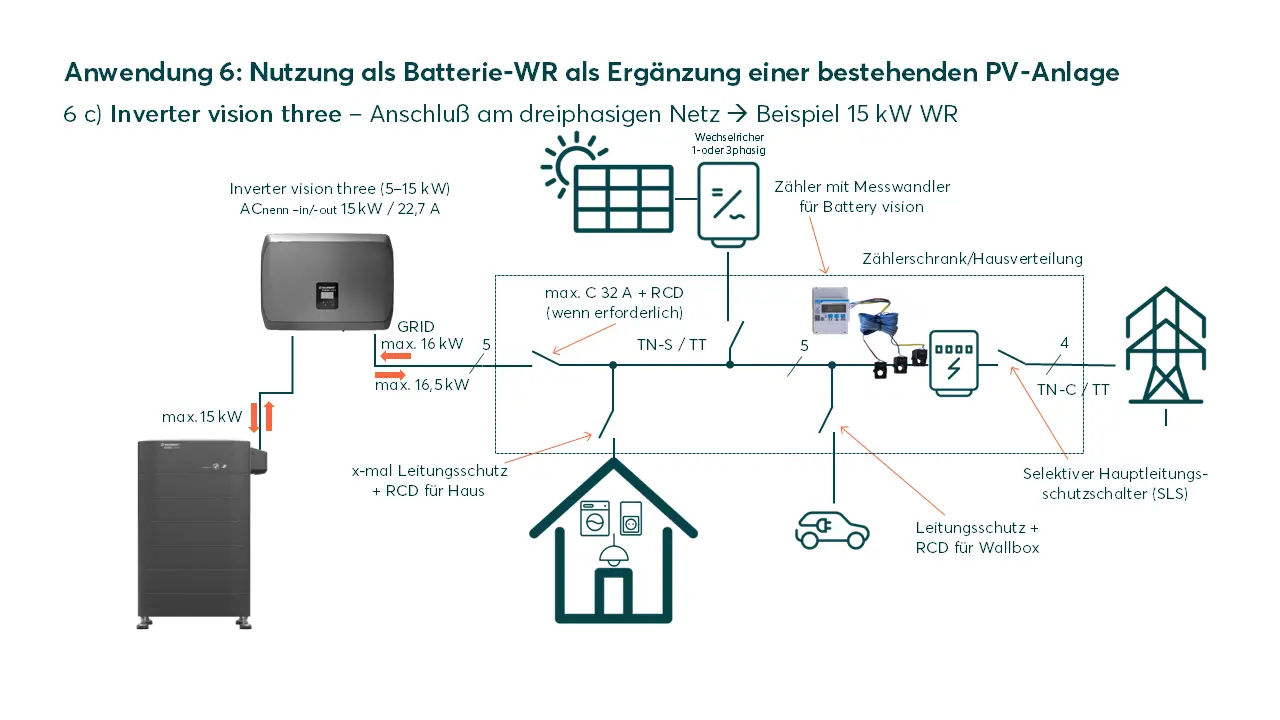
Addition of the Inverter vision three as a battery inverter to an existing PV plant
The Inverter vision three can be operated as a battery inverter with a Battery vision between 3 and 7 packs (7.8 - 18.2kWh) without the direct connection of a PV plants. The use case described here shows the solution for an existing PV plant that is to be supplemented by a battery.
When installing the chint meter (included in the scope of delivery), it should be noted that the existing PV inverter(s) are installed within the balancing circuit of the chint meter, are recorded as "house-side" and thus the PV generation and its surplus is used to charge the battery.
Note on the configuration of such a system in the SOLARWATT Manager:
- for correct balancing of the system, the existing PV plants must be configured in addition to Battery and Inverter vision. Further information on configuring the Inverter vision in the SOLARWATT Manager can be found in the Manager's online manual
Hybrid inverter (supplement to existing PV plants)
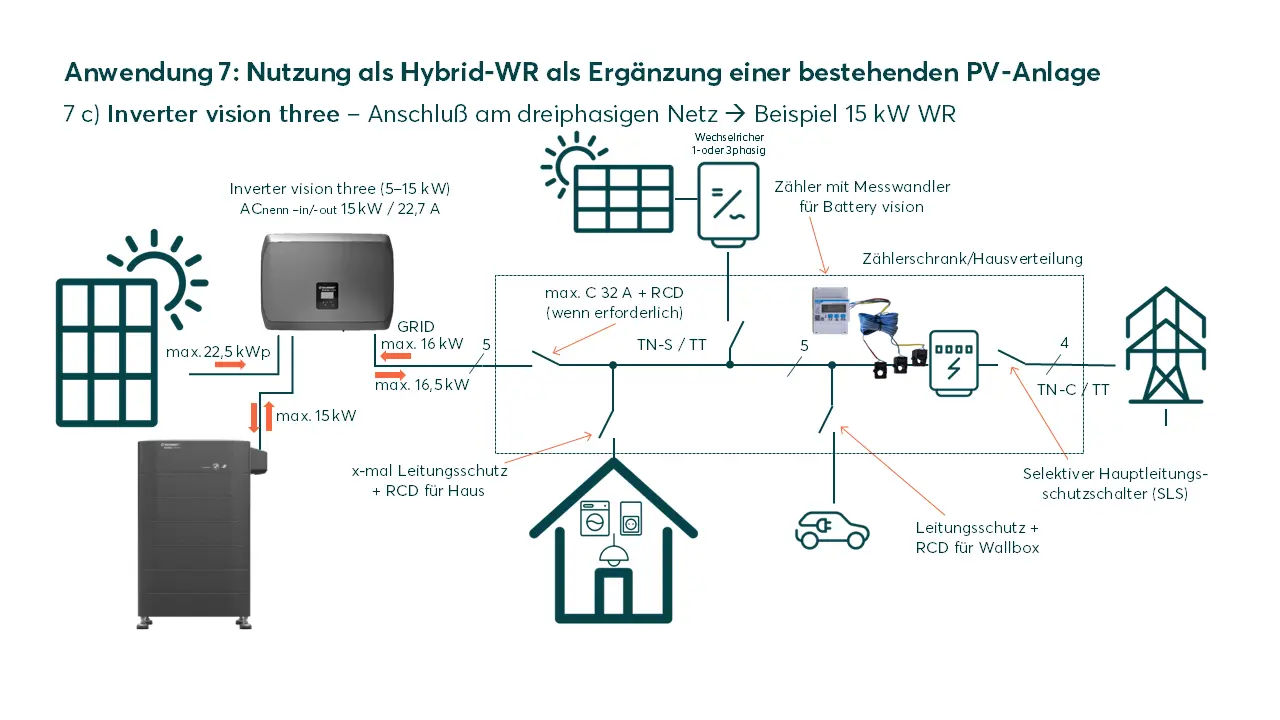
Addition of the Inverter vision three as a hybrid inverter to an existing PV plant
The Inverter vision three with a connected PV plant and a Battery vision between 3 and 7 packs (7.8 - 18.2kWh) can also supplement an existing PV plant as a hybrid inverter. The addition of a battery is thus combined with a simultaneous expansion of the PV plants.
Important settings in the SOLARWATT Manager EM.Setup:
When installing the Chint-Meter (included in the scope of delivery), please note that the existing PV inverter(s) installed within the balancing circuit of the Chint-Meter are recorded as "house-side" and thus the PV generation and its surplus is used for battery charging.
For further solar optimization of individual consumers up to the heat pump and/or charging of the electric vehicle, the SOLARWATT Manager as a separate accessory is the "must have" addition to the system.
Important settings during commissioning
Regardless of whether you convert the existing Inverter vision three into a hybrid inverter with a battery retrofit or continue to operate it as a pure PV inverter, the following must be ensured via the settings on the inverters when commissioning the inverters:
- communication to the battery and meter must be activated for the inverter that is used as a hybrid in verter (this is the default setting for Inverter vision three)
- for the inverter that is used as a PV inverter
- if it is an Inverter vision one, communication to the meter via the inverter display must be deactivated
- if it is an Inverter vision three, communication with the meter and the battery must be deactivated via the inverter display
Follow the instructions under the following two links:
Settings on the Inverter vision one display to deactivate communication with the meter
Settings on the Inverter vision three display to deactivate communication with the meter
Settings on the Inverter vision three display for deactivating communication with the battery
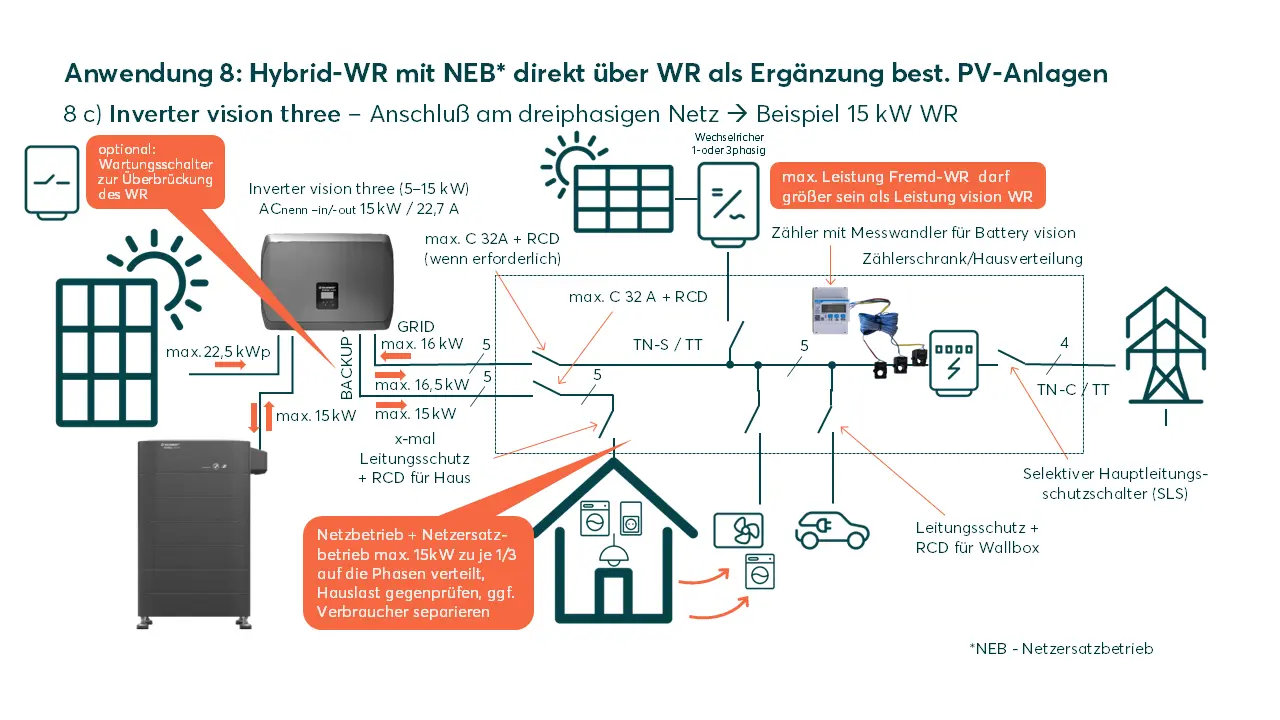
Hybrid inverter (NEB* via inverter, addition to existing PV plants)
Addition of the Inverter vision three as a hybrid inverter to an existing PV plant including Backup mode (NEB)
Variant 7 already describes the combination of use as a hybrid inverter including the addition of an existing PV plants, in addition to which consumers or an entire household can continue to be supplied even in the event of a grid failure. The variant described here is designed without the Battery vision backup booster; the grid 0 - emergency power changeover switch (or maintenance switch) can be installed as a useful addition; the advantage of this accessory component is explained in the general planning information.
It is essential to pay attention to the maximum power of the loads connected to the backup output of the inverter! This must not be exceeded, neither in total power nor per phase (1/3 of the total power). Attention: this applies both in grid operation and in Backup mode.
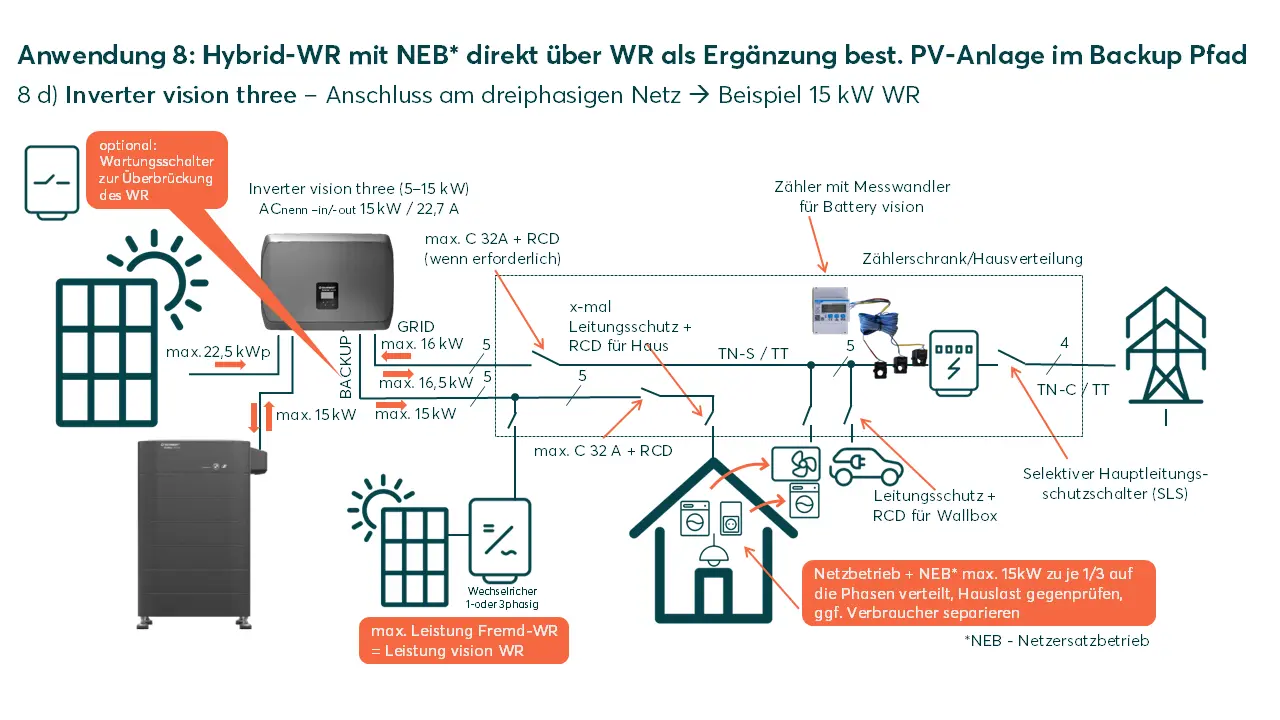
Hybrid inverter (NEB* via inverter, addition of existing PV plants in the backup path)
Addition of Inverter vision three as a hybrid inverter including backup mode (NEB), existing PV plants connected in the backup path
Variant 7 already describes the combination of use as a hybrid inverter including the addition of an existing PV plant; in addition, consumers, an entire household or an existing PV plant can continue to be supplied even in the event of a grid failure. The variant described here is designed without the Battery vision backup booster; the grid 0 - emergency power changeover switch (or maintenance switch) can be installed as a useful addition; the advantage of this accessory component is explained in the general planning information.
The connection of the existing PV plants in the backup path is only possible if the power of the existing (third-party) inverter is NOT greater than the power of the newly installed Inverter vision three.
ATTENTION: Settings must be made on the Inverter vision three by Solarwatt Support for the connection of an existing PV plant in the backup path.
It is essential to pay attention to the maximum power of the loads connected to the backup output of the inverter! This must not be exceeded either in terms of total power or per phase (1/3 of the total power). Attention: this applies both in grid operation and in Backup mode.
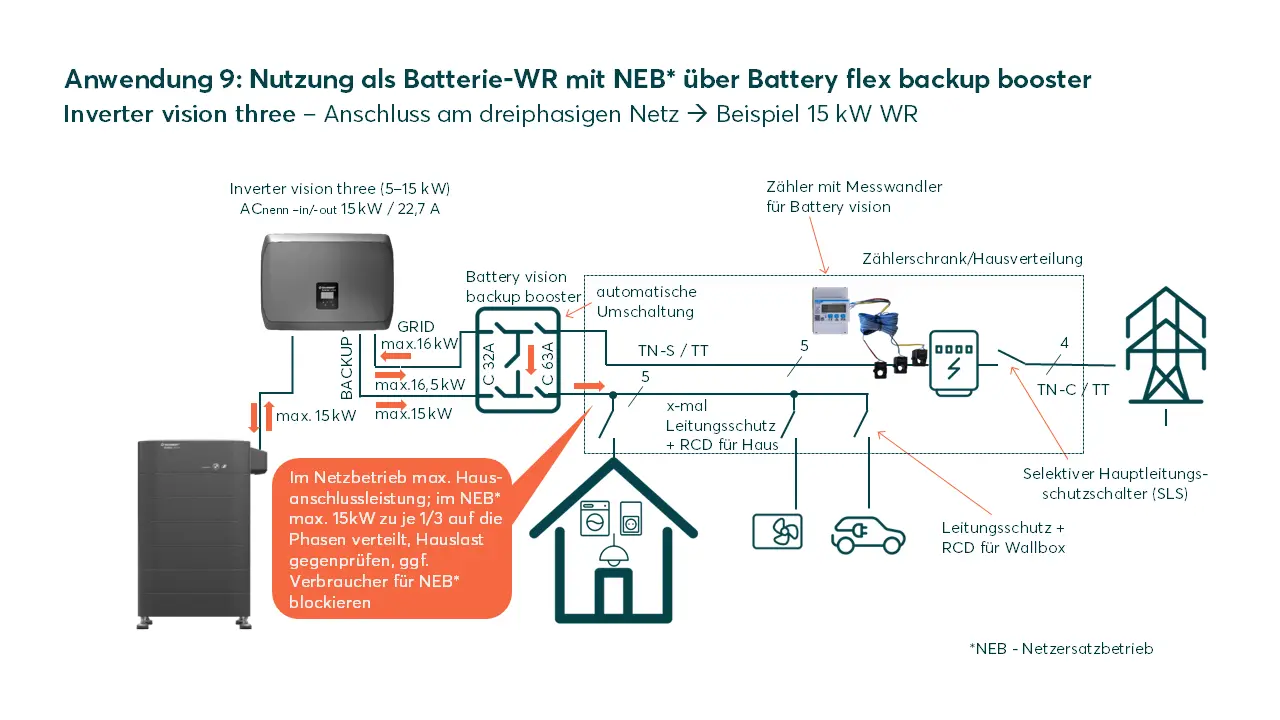
Battery inverter (NEB* via backup booster)
Use of the Inverter vision three as a battery inverter including backup mode (NEB) via Battery vision backup booster
In addition to the applications for the battery inverter from variant 4, consumers or an entire household can continue to be supplied with power even in the event of a power failure. The variant described here shows the concept with the Battery vision backup booster. The advantage of this accessory component is explained in the general planning information.
In contrast to the variants without the Battery vision backup booster, the only thing that needs to be taken into account here is the maximum power of the loads that are also to be supplied in backup mode. These must not exceed the inverter output, either in terms of total output or per phase (1/3 of the total output). There is no limitation by the inverter for normal grid operation.
Note on the configuration of such a system in the SOLARWATT Manager:
- for correct balancing of the system, a PV plants must be created, which in this case must be created with 0kW power. Further information on configuring the Inverter vision in the SOLARWATT Manager can be found in the Manager's online manual
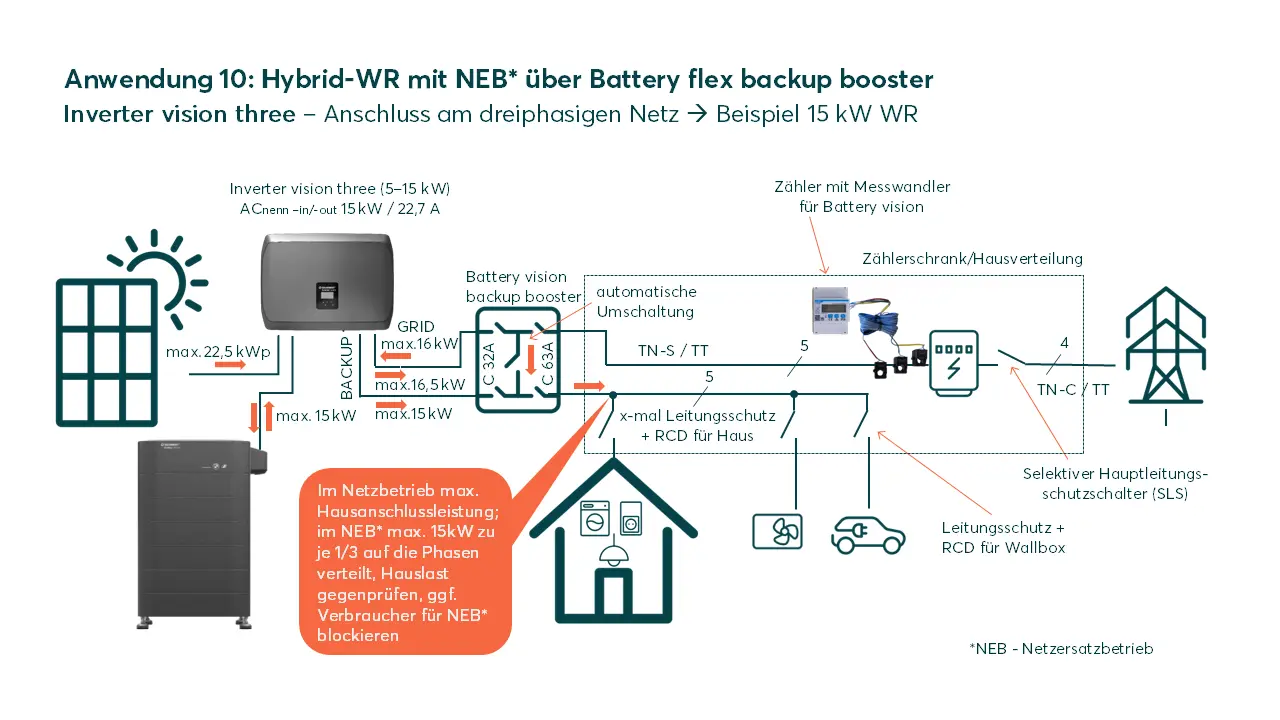
Hybrid inverter (NEB* via backup booster)
Use of the Inverter vision three as a hybrid inverter including backup mode (NEB) via Battery vision backup booster
In addition to the hybrid inverter application described in variant 3, consumers or an entire household can continue to be supplied with power even in the event of a power failure. The variant described here shows the concept with the Battery vision backup booster. The advantage of this accessory component is explained in the general planning information.
In contrast to the variants without the Battery vision backup booster, the only thing that needs to be taken into account here is the maximum power of the loads that are also to be supplied in backup mode. These must not exceed the inverter output, either in total output or per phase (1/3 of the total output). There is no limitation by the inverter for normal grid operation.
For further solar optimization of individual loads up to the heat pump and/or charging of the electric vehicle, the SOLARWATT Manager flex or Manager rail as a separate accessory is the "must have" addition to the system.
Hybrid inverter (NEB* via backup booster, addition of existing PV plants in the backup path)
Use of the Inverter vision three as a hybrid inverter and as a supplement to an existing PV plant, including backup mode via Battery vision backup booster
The Inverter vision three with a connected PV plant and a Battery vision between 3 and 7 packs (7.8 - 18.2kWh) can also supplement an existing PV plant as a hybrid inverter. In addition, consumers or an entire household can continue to be supplied here even in the event of a grid failure.
The connection of the existing PV plants in the backup path is only possible if the output of the existing (third-party) inverter is NOT greater than the output of the newly installed Inverter vision three.
ATTENTION: Settings must be made on the Inverter vision three by Solarwatt Support for the connection of an existing PV plant in the backup path.
In contrast to the variants without Battery vision backup booster, only the maximum power of the loads that are also to be supplied in Backup mode must be taken into account here. These must not exceed the inverter output, either in total output or per phase (1/3 of the total output). There is no limitation by the inverter for normal grid operation.
Important settings during commissioning
Regardless of whether you convert the existing Inverter vision three into a hybrid inverter with a battery retrofit or continue to operate it as a pure PV inverter, the following must be ensured via the settings on the inverters when commissioning the inverters:
- communication to the battery and meter must be activated for the inverter that is used as a hybrid in verter (this is the default setting for Inverter vision three)
- for the inverter that is used as a PV inverter (if it is an Inverter vision), communication to the meter and battery must be deactivated via the inverter display
Follow the instructions under the following two links:
Settings on the Inverter vision three display to deactivate communication with the meter
Settings on the Inverter vision three display for deactivating communication with the battery
Important settings in the SOLARWATT Manager EM.Setup:
When installing the chint meter (included in the scope of delivery), please note that the existing PV inverter(s) are installed within the balancing circuit of the chint meter, are recorded as "house-side" and thus the PV generation and its surplus is used for battery charging.
For further solar optimization of individual consumers up to the heat pump and/or charging of the electric vehicle, the SOLARWATT Manager as a separate accessory is the "must have" addition to the system.
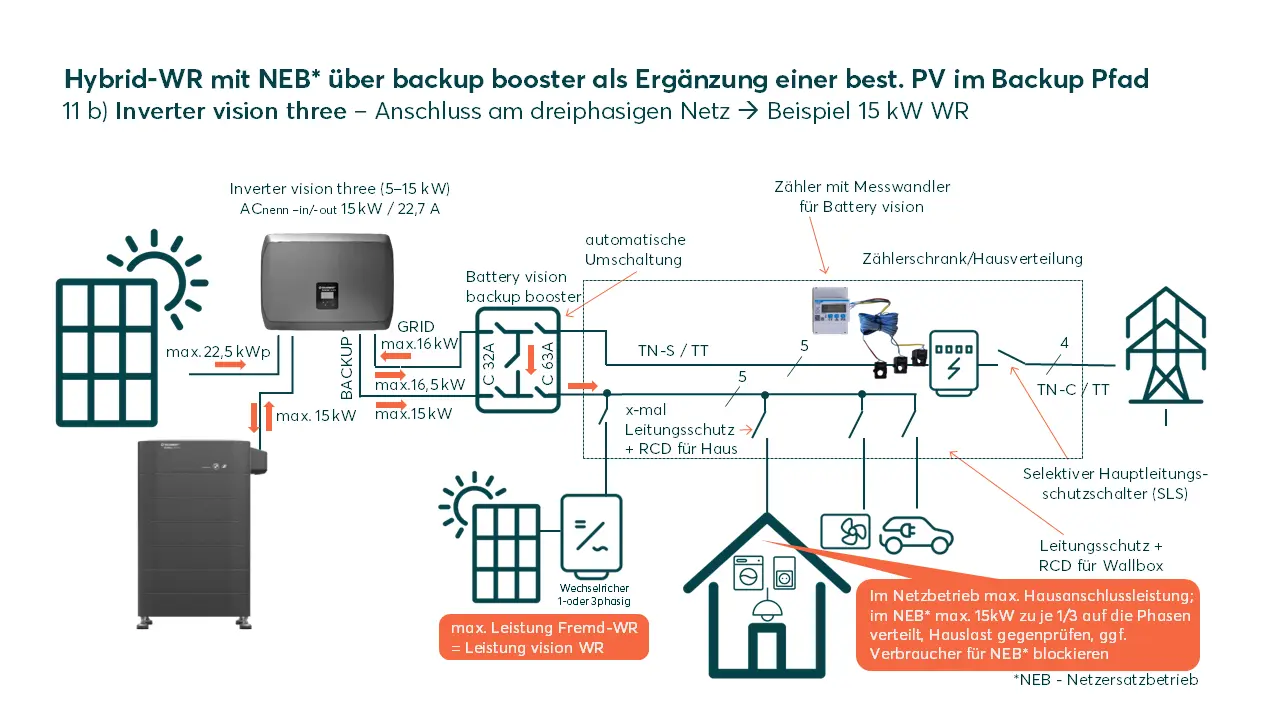
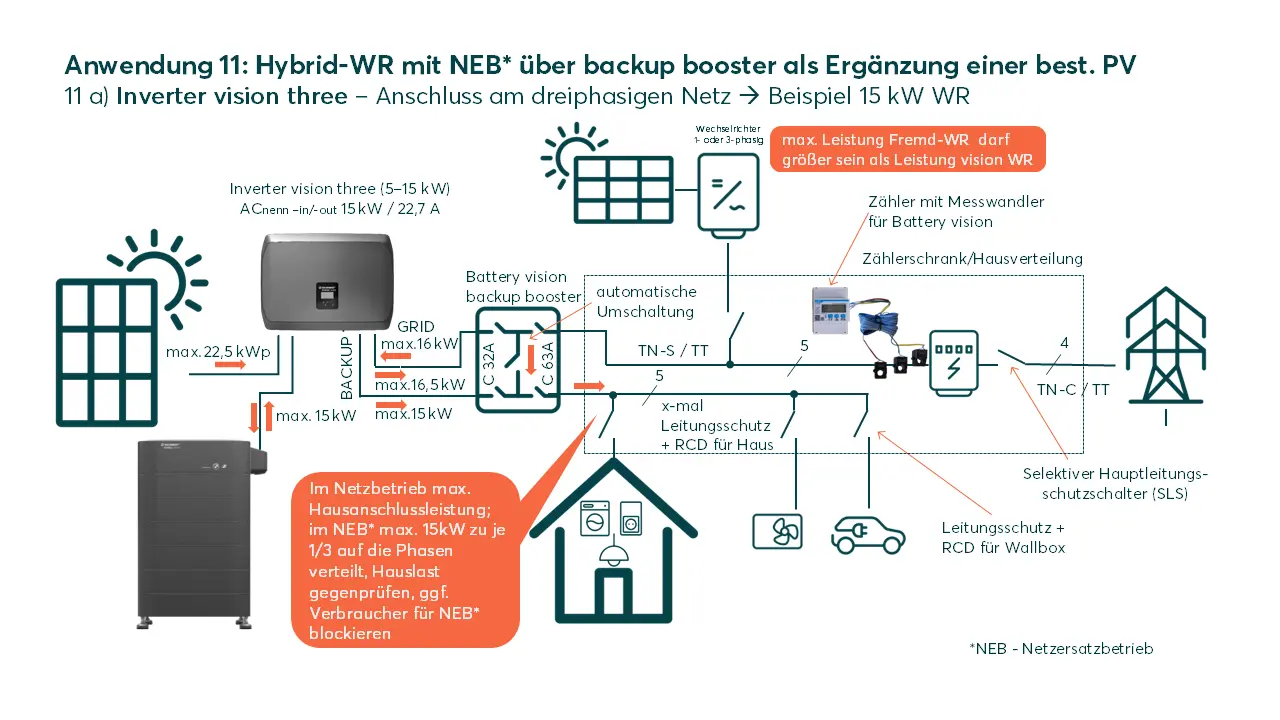
Hybrid inverter (NEB* via backup booster, existing PV plants)
Use of the Inverter vision three as a hybrid inverter and as a supplement to an existing PV plant including Backup mode (NEB) via Battery vision backup booster
The Inverter vision three with connected PV plants and a Battery vision between 3 and 7 packs (7.8 - 18.2kWh) can also supplement an existing PV system as a hybrid inverter. In addition, consumers or an entire household can continue to be supplied in the event of a power failure.
In contrast to the variants without Battery vision backup booster, only the maximum power of the loads that are to be supplied in Backup mode must be taken into account here. These must not exceed the inverter output, either in total output or per phase (1/3 of the total output). There is no limitation by the inverter for normal grid operation.
Important settings during commissioning
Regardless of whether you convert the existing Inverter vision three into a hybrid inverter with a battery retrofit or continue to operate it as a pure PV inverter, the following must be ensured via the settings on the inverters when commissioning the inverters:
- communication to the battery and meter must be activated for the inverter that is used as a hybrid in verter (this is the default setting for Inverter vision three)
- for the inverter that is used as a PV inverter (if it is an Inverter vision), communication to the meter and battery must be deactivated via the inverter display
Follow the instructions under the following two links:
Settings on the Inverter vision three display to deactivate communication with the meter
Settings on the Inverter vision three display for deactivating communication with the Battery
Important settings in the SOLARWATT Manager SmartSetup
When installing the chint meter (included in the scope of delivery), please note that the existing PV inverter(s) are installed within the balancing circuit of the chint meter, are recorded as "house-side" and thus the PV generation and its surplus is used for battery charging.
For further solar optimization of individual consumers up to the heat pump and/or charging of the electric vehicle, the SOLARWATT Manager as a separate accessory is the "must have" addition to the system.