- SOLARWATT Battery & Inverter vision
- Planning
- Inverter vision one (3-phase supply)
Inverter vision one (3-phase supply)
General Planning Guidelines
These notes apply generally to all of the following application examples for the Inverter vision one.
Sizing Guidelines for Inputs and Outputs of the Inverter vision one
The terminals in the Inverter vision one connector are suitable for the following conductor cross sections.
AC connection: 3-wire, 4.0–16.0 mm²
BACKUP connection: 3-wire, 4.0–6.0mm²
Using 3x6 mm², 3x10 mm², and 3x16 mm² as examples, and taking into account the permissible voltage drop for PV generators [1%] and loads [3%, calculated here proportionally at 2%], the following cable lengths can be implemented:
Overview for Generators—1% Voltage Drop, Installation Type B2
Inverter Power Class [kW] | Max. AC Input Power [kW] | Length [m] for conductor cross section [mm²]/max. fuse rating | ||
| 6²/C32 | 10²/C50 | 16²/C63 | ||
6 | 12 | Not allowed | Not allowed | 13 |
5 | 10 | Not allowed | 10 | 16 |
4.6 | 9.2 | Not allowed | 11 | 17 |
3.7 | 7.4 | Not allowed | 13 | 20 |
3 | 6 | 10 | 16 | 26 |
Overview for Consumers - Proportional 2% Voltage Drop, Installation Type B2
Inverter power class [kW] | Length [m] for conductor cross section [mm²]/max. fuse rating 4²/C25 6²/C32 (only for hexagonal crimp) | |
6 | Not permitted | 20 |
5 | Not permitted | 23 |
4.6 | 17 | 26 |
3.7 | 21 | 32 |
3 | 26 | 39 |
Caution! This information is intended as a sizing guide and is based on specific assumptions regarding installation type (B2), cable density (2), and ambient temperature (30 °C). The suitability of the recommended cables and fuses must always be verified based on the specific conditions.
Decision-Making Guide for Using a Grid-0 Emergency Power Transfer Switch
A load or an entire household connected via the backup output of the Inverter vision is supplied, both during regular grid operation and during Backup mode, with the output power of the selected Inverter vision as specified in the Inverter vision one data sheet at under the heading “Backup mode.” This value roughly corresponds to the power class of the selected inverter; for example, a 6 kW unit can also provide 6 kW via the backup output.
Backup mode directly from the Inverter vision’s backup output is advisable if:
- the intended household has a single-phase power supply sufficient for up to 6 kW and an Inverter vision one 1.0 (6 kW) can be used
or
- only one or two larger loads (e.g., EV Charger and heat pump) would exceed the power limit and these are separated in the main distribution panel as devices not connected to the emergency power supply
or
- the customer wishes to power only a few selected circuits during a power outage, which are connected via the backup output
or
- The customer simply wants an emergency power outlet that provides power to individual loads during both regular grid operation and Backup mode
Taking these conditions into account, a decision must be made as to whether the system should be equipped with the additional “Mains – 0 – emergency power” transfer switch component. This component makes it possible to supply the connected loads or an entire household with the available service connection capacity during normal grid operation. In backup mode, the power output in this variant is also limited to the specifications listed in the data sheet.
The Grid-0-emergency power switch (also referred to as a maintenance switch) is a simple, manual switching option. In consultation with the user, it can have two different default positions. The question of when the switch must be activated depends on this decision:
1. Manual switching to emergency power mode:
By default, the switch is set to the “Mains” position and supplies power directly to the connected circuits
--> The user must “deliberately” switch to emergency power mode in the event of a power outage
2. Manual switchover to direct utility power supply:
By default, the switch is set to the “Emergency Power” position and supplies the connected circuits via the inverter, both during utility grid operation and during Backup mode.
--> The transfer switch serves as a maintenance switch to keep the circuits connected to the inverter’s backup output powered in the event of an inverter failure or replacement.
Additional optional accessories complement the Battery & Inverter vision product line and can be ordered separately from the Solarwatt Shop:
- Battery cables ( 3 m, 5 m, or 10 m ) --> The scope of delivery includes a 1.5 m cable to connect the battery to the inverter. This length is sufficient if the inverter is installed directly above the battery. For other configurations, the lengths listed above must be ordered separately.
- Battery vision cable cover --> to cover the side connection area on the Battery vision top pack
- DC surge protector, for 2 MPP trackers, to provide additional protection for the PV inputs of the Inverter vision one.
Residual Current Circuit Breaker (RCD) at the Grid Output
Installing a fault current circuit breaker upstream of the inverter is optional and depends primarily on country-specific regulations or local requirements (e.g., specific fire safety regulations) governing the use of fault current circuit breakers.
If a fault current circuit breaker is installed, the breaker must have a rated residual current of at least 100 mA.
This planning section provides circuit diagrams for each planned system configuration, which also include the optional residual-current circuit breakers.
Residual Current Circuit Breaker (RCD) at the backup output
For backup power operation, an additional external residual current circuit breaker must be installed at the backup output to ensure that residual current protection requirements are met even during off-grid operation.
| Inverter | Central RCD at the backup output |
| Inverter vision one | Type A, ≥ 100 mA |
| Inverter vision three | Type A, ≥ 300 mA |
| Inverter vision max | Type A, ≥ 300 mA |
Existing 30-mA RCDs in the final circuits must continue to be installed in accordance with national installation regulations.
RCD Selection: Type A or Type A S
Depending on the system configuration, either a Type A RCD or a selective Type A S RCD can be used for the central RCD at the backup output. This selection affects the tripping behavior in the event of faults in the downstream final circuits.
The linked selection guide explains the differences between Type A and Type A S, the requirements for using a selective RCD, and the necessary verification of the tripping conditions. The goal is to achieve the most selective tripping possible so that, in the event of a fault, only the affected final circuit—and not the entire backup supply—is shut down whenever possible.
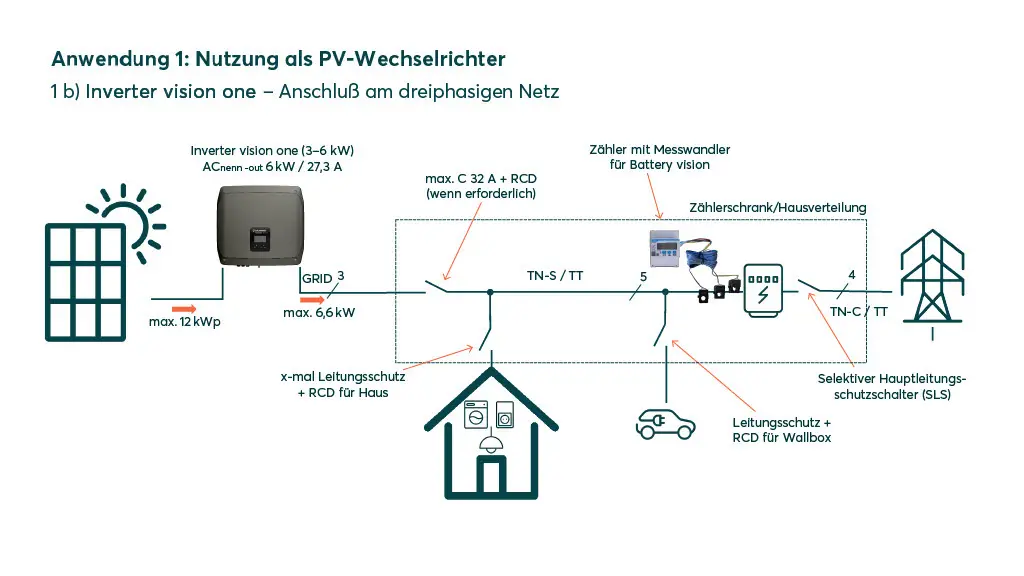
PV-inverter
Using the Inverter vision one as a PV Inverter
The Inverter vision one can be operated as a PV inverter without connecting a battery. This can be useful if, for example, you plan to retrofit a battery at a later date.
In this configuration, self-consumption can only be optimized by switching on controllable loads when there is a PV surplus.
Using the SOLARWATT Manager
To display the overall energy balance in the SOLARWATT Home app and the SOLARWATT Manager portal and to optimize controllable loads, installation of the 3-phase Chint meter DTSU (sold separately) and a SOLARWATT Manager (sold separately). The included single-phase Chint meter DDSU is not required in this case.
Important settings in SOLARWATT Manager SmartSetup
A battery is automatically created during the device search. Delete it.
Battery inverter
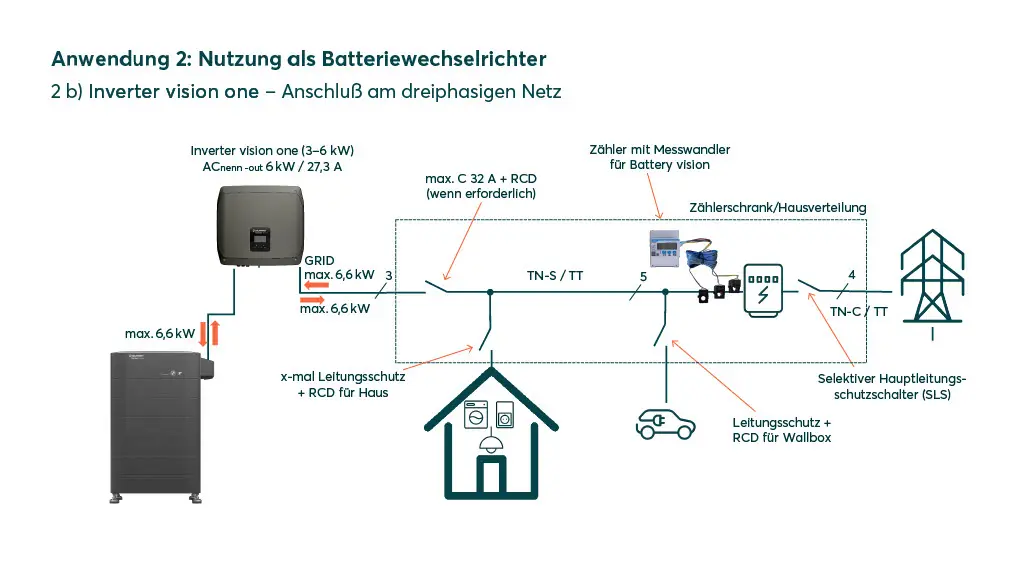
Using the Inverter vision one as a Battery Inverter
The Inverter vision one can be operated as a battery inverter with a Battery vision comprising between 2 and 7 packs (5.2–18.2 kWh) without being connected to a PV plant. This can be useful, for example, when the battery is used to optimize electricity costs by taking advantage of dynamic rate models (“time-of-use”) or is integrated into an energy system to shift peak loads (“peak shaving”).
For the aforementioned applications, installation of the 3-phase Chint DTSU meter (sold separately) and a Manager Flex or Manager Rail (sold separately) is required.
Note on configuring such a system in the SOLARWATT Manager:
- To ensure correct system balancing, it is essential to create a PV plant, which in this case must be configured with a power rating of 0 kW. Further information on configuring the Inverter vision in the SOLARWATT Manager can be found in the Manager’s online manual.
Hybrid inverter
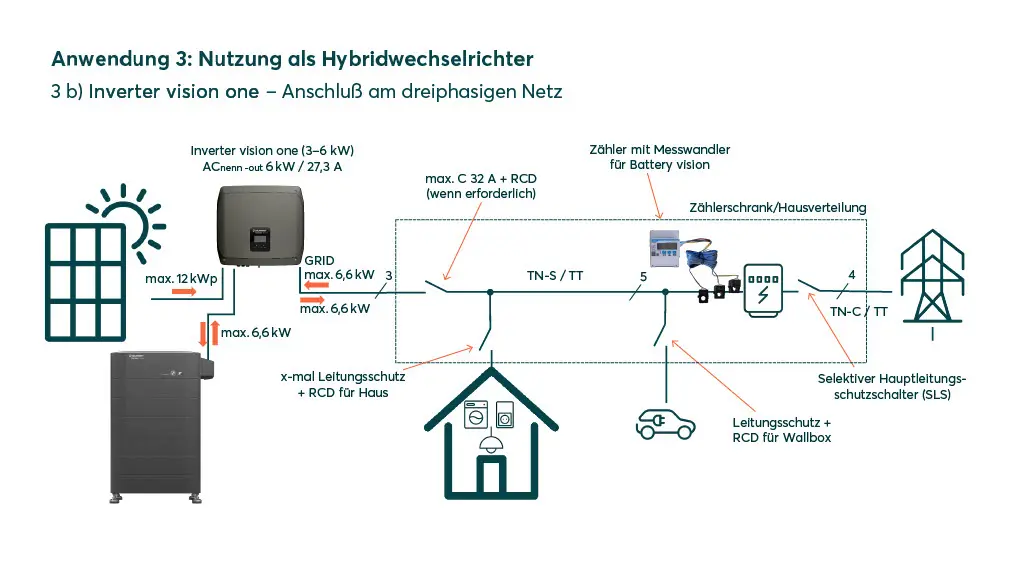
Using the Inverter vision one as a Hybrid Inverter
The Inverter vision one, connected to a PV system and a Battery vision with between 2 and 7 packs (5.2–18.2 kWh), represents the classic application of the device as a hybrid inverter. It is the most sensible solution for achieving the highest possible degree of self-sufficiency in a home’s energy supply.
For further solar optimization of individual loads—including heat pumps and/or electric vehicle charging—the Solarwatt Manager Flex or Manager Rail, available as a separate accessory, is the “must-have” addition to the system.
This requires the installation of the 3-phase Chint meter DTSU (separate accessory). The included 1-phase Chint meter DDSU is not needed in this case.
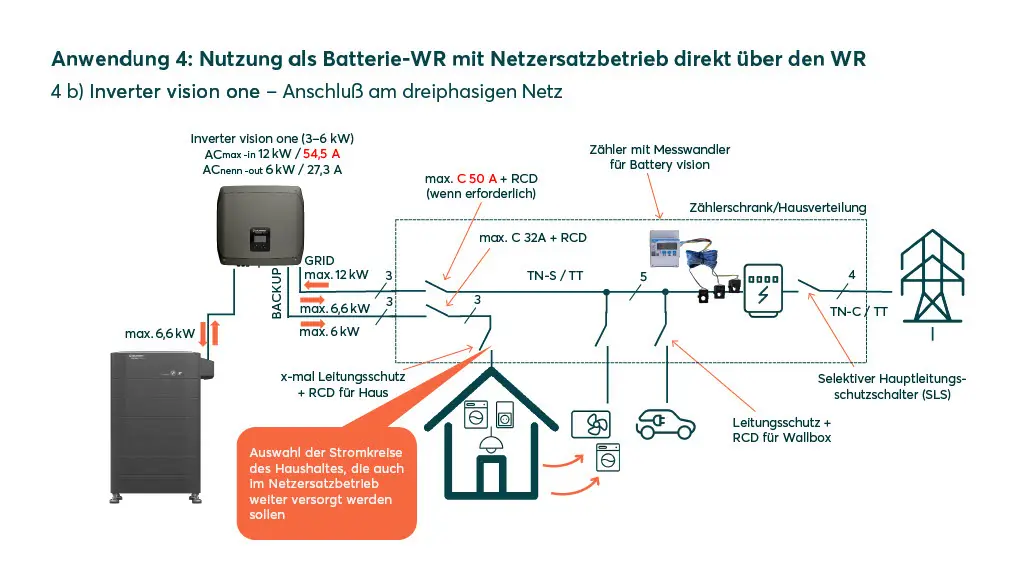
Battery-Powered Inverter (Backup mode via inverter)
Using the Inverter vision one as a battery inverter, including Backup mode
In addition to the applications for the battery inverter described in Variant 2, single-phase loads can continue to be powered here even during a power outage. The variant described here is designed without the Battery vision backup booster; however, the grid-to-emergency power transfer switch (or maintenance switch) can be installed as an additional component. The advantage of this accessory is explained in the general planning guidelines.
It is essential to ensure that the totalpower of the loads connected to the inverter’s backup output does not exceedthe maximum power rating! This limit must not be exceeded. Note: This applies to both grid operation and Backup mode.
Note on configuring such a system in the SOLARWATT Manager:
- Installation of the 3-phase Chint DTSU meter (sold separately) is required
- To ensure correct system balancing, a PV plant must be created; in this case, it must be configured with a power rating of 0 kW. Further information on configuring the Inverter vision in the SOLARWATT Manager can be found in the Manager’s online manual
Hybrid Inverter (Backup mode via inverter)
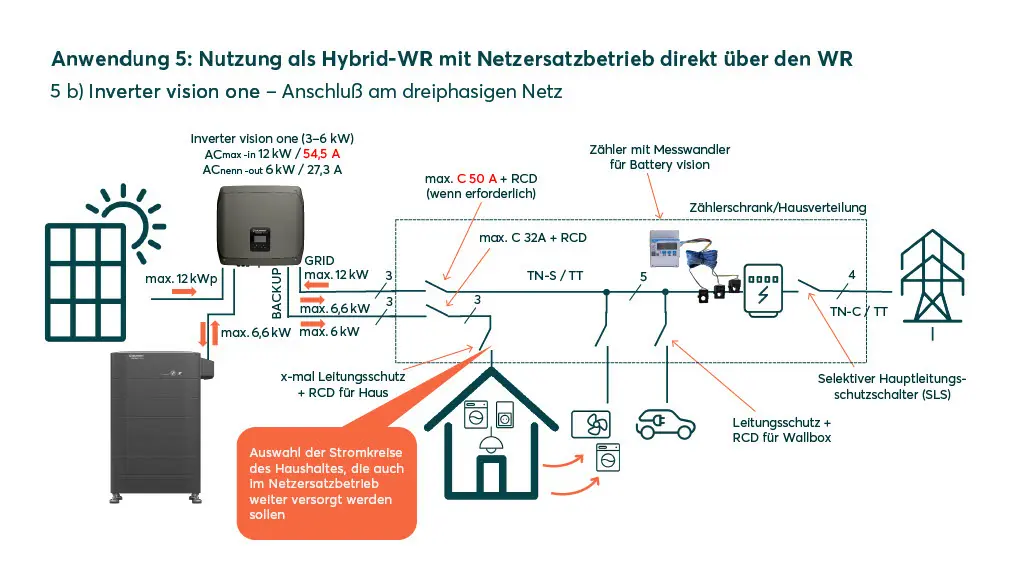
Using the Inverter vision one as a hybrid inverter, including Backup mode
In addition to the hybrid inverter application described in Variant 3, single-phase loads can continue to be powered here even during a power outage. With the variant described here, the grid-to-emergency power switch (or maintenance switch) can be installed as an additional component; the advantage of this accessory is explained in the general planning notes.
It is essential to pay attention to the maximum power of the loads connected to the inverter’s backup output! The total power must not exceedthis limit . Note: This applies to both grid operation and Backup mode.
For further solar optimization of individual loads—including heat pumps and/or single-phase charging of electric vehicles—the SOLARWATT Manager flex or Manager rail, available as a separate accessory, is a “must-have” addition to the system. This requires the installation of the 3-phase Chint DTSU meter (separate accessory).
Battery Inverter (Add-on to Existing PV plants)
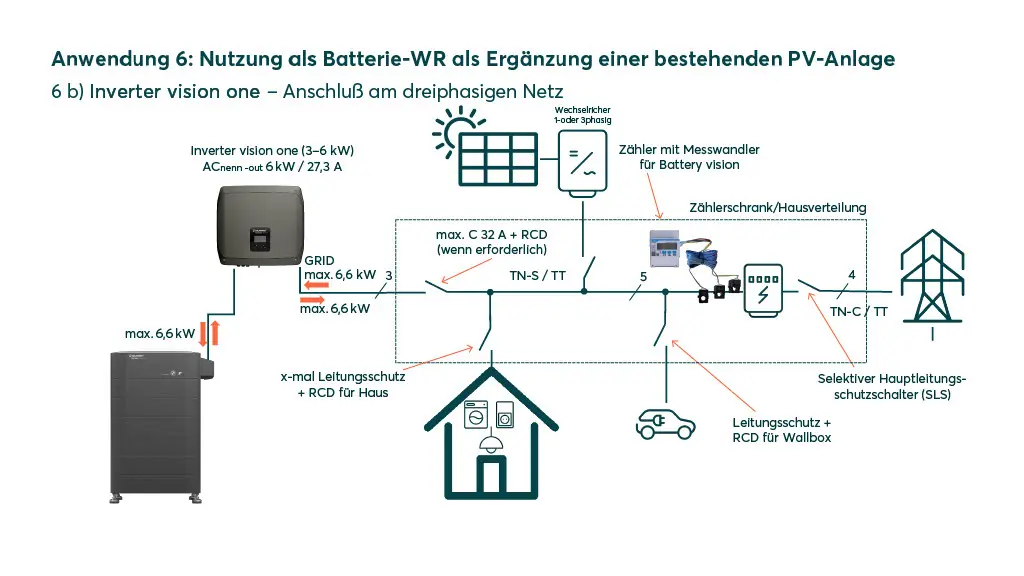
Adding the Inverter vision one as a battery inverter to an existing PV plant
The Inverter vision one can be operated as a battery inverter with a Battery vision comprising between 2 and 7 packs (5.2–18.2 kWh) without being directly connected to a PV plant. The use case described here illustrates the solution for an existing PV plant that is to be supplemented with a battery.
During installation, the 3-phase Chint meter DTSU (sold separately) must be used during installation, and care must be taken to ensure that the existing PV inverter(s) are installed within the Chint meter’s metering loop, are recorded as “on-site,” and that the PV generation and its surplus are thus used to charge the battery.
If the existing PV plant is single-phase, the Inverter vision one must be connected to the Battery vision on the same phase.
Note on configuring such a system in the SOLARWATT Manager:
- To ensure correct system metering, the existing PV plant must be configured in addition to the Battery and Inverter vision. Further information on configuring the Inverter vision in the SOLARWATT Manager can be found in the Manager’s online manual.
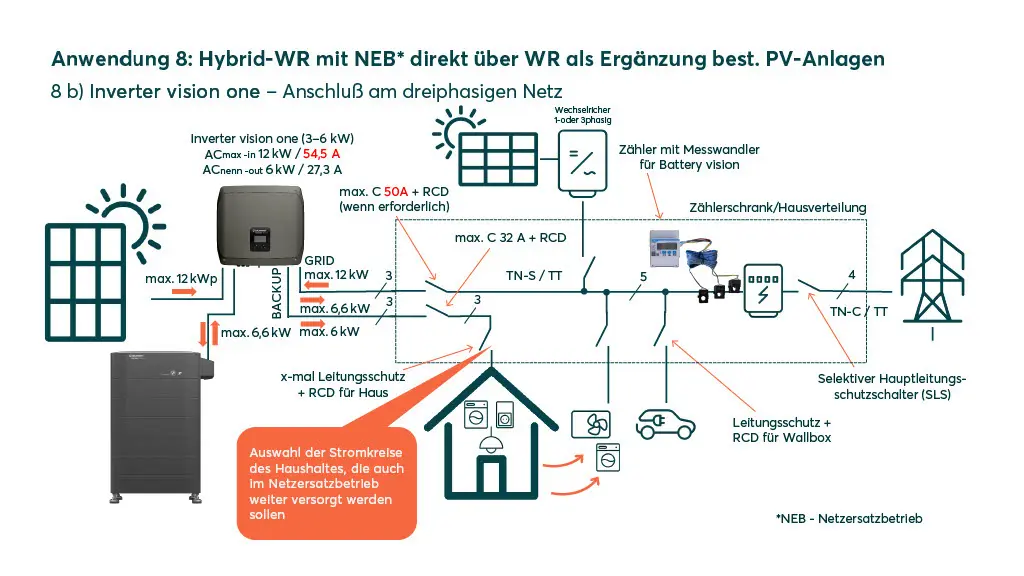
Hybrid Inverter (Add-on to Existing PV plants)
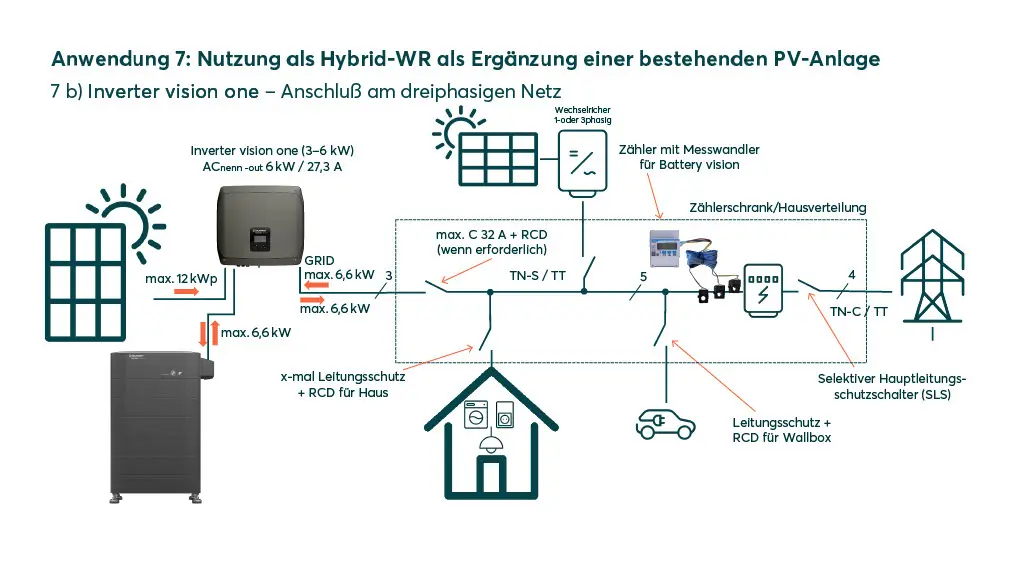
Adding the Inverter vision one as a hybrid inverter to an existing PV plant
The Inverter vision one, when connected to a PV system and a Battery vision with between 2 and 7 packs (5.2–18.2 kWh), can also serve as a hybrid inverter to supplement an existing PV plant. Adding a battery is thus combined with a simultaneous expansion of the PV plant.
If the existing PV plant is single-phase, the Inverter vision one must be connected to the Battery vision on the same phase.
Important settings in SOLARWATT Manager SmartSetup
During installation, the 3-phase Chint meter DTSU (sold separately) must be used during installation, and care must be taken to ensure that the existing PV inverter(s) are installed within the Chint meter’s metering loop, are recorded as “on-site,” and that the PV generation and its surplus are used to charge the battery.
For further solar optimization of individual loads—including heat pumps and/or single-phase charging of electric vehicles—the SOLARWATT Manager, available as a separate accessory, is the “must-have” addition to the system.
Important Settings During Commissioning of the
Whether you are converting an existing Inverter vision three/one with a battery retrofit into a hybrid inverter or continue to operate it as a pure PV inverter, the following must be ensured via the inverter settings during commissioning:
- For the inverter being used as a hybrid inverter, communication with the battery and meter must be enabled (this is the default setting for the Inverter vision three/one inverter)
- For the inverter being used as a PV inverter
- If it is an Inverter vision one, communication with the meter must be deactivated via the inverter’s display
- If it is an Inverter vision three, communication with the meter and the battery must be deactivated via the inverter’s display
To do this, follow the instructions at the two links below:
Settings on the Inverter vision one display to disable communication with the meter
Settings on the Inverter vision three display to disable communication with the meter
Settings on the Inverter vision three display to disable communication with the battery
Hybrid Inverter (Backup Mode via Inverter, Supplement to Existing PV Plant)
Addition of the Inverter vision one as a hybrid inverter to an existing PV plant, including Backup mode
Variant 7 already describes the combination of use as a hybrid inverter, including the integration with an existing PV plant; in addition, single-phase loads can continue to be powered even during a grid outage. In the configuration described here, a grid-to-0-to-emergency power switch (or maintenance switch) can also be installed; the advantage of this accessory is explained in the general planning guidelines.
It is essential to pay attention to the maximum power of the loads connected to the inverter’s backup output! The total power must not exceedthis limit . Note: This applies to both grid operation and Backup mode.
If the existing PV plant is single-phase, the Inverter vision one must be connected to the Battery vision on the same phase.
Important Settings in SOLARWATT Manager SmartSetup
During installation, use the 3-phase Chint meter DTSU (sold separately) must be used during installation, and care must be taken to ensure that the existing PV inverter(s) are installed within the Chint meter’s metering loop, are recorded as “on-site,” and that PV generation and its surplus are thus used for battery charging.
For further solar optimization of individual loads—including heat pumps and/or single-phase charging of electric vehicles—the SOLARWATT Manager, available as a separate accessory, is the “must-have” addition to the system.
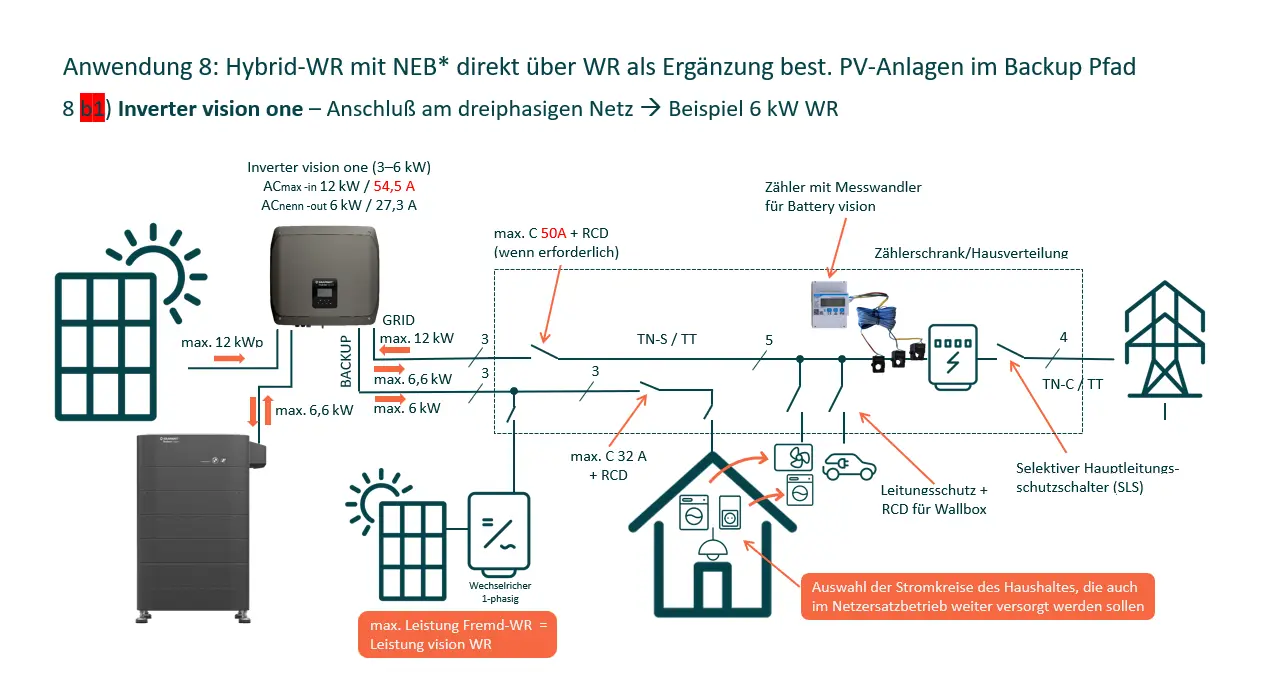
Hybrid inverter (Backup mode via inverter, supplementing an existing PV plant in the backup path)
Addition of the Inverter vision one as a hybrid inverter to an existing PV plant in the backup path, including Backup mode
Variant 7 already describes the combination of use as a hybrid inverter, including the integration with an existing PV plant; in addition, single-phase loads can continue to be powered even during a power outage. In the configuration described here, a grid-to-0-to-emergency power switch (or maintenance switch) can also be installed; the advantage of this accessory is explained in the general planning guidelines.
It is essential to pay attention to the maximum power of the loads connected to the inverter’s backup output! The total power must not exceedthis limit . Note: This applies to both grid operation and Backup mode.
The existing PV plant must be single-phase, as the inverter must synchronize with the single-phase grid provided by Inverter vision one during backup operation.
Connecting the existing PV plant to the backup path is only possible if the power rating of the existing (third-party) inverter is NOT greater than the power rating of the newly installed Inverter vision one.
ATTENTION: To connect an existing PV plant to the backup path, settings must be configuredon the SOLARWATT Inverter vision one by Solarwatt Support.
Function: The Inverter vision one provides a compliant grid to the (third-party) inverter in the backup path. This inverter synchronizes with the grid and can charge the Battery vision even during a backup scenario. When the SOC reaches 88%, the Inverter vision three increases the frequency of the supplied grid to 51.5 Hz, thereby keeping the backup system within a stable operating range. If the SOC falls below 77%, the frequency is reset to 50.0 Hz, and the (third-party) inverter can resynchronize.
Important settings in SOLARWATT Manager SmartSetup
During installation, use the 3-phase Chint meter DTSU (separate accessory) must be used during installation, and care must be taken to ensure that the existing PV inverter(s) are installed within the Chint meter’s metering loop, are recorded as “on-site,” and that PV generation and its surplus are thus used for battery charging.
For further solar optimization of individual loads—including heat pumps and/or single-phase charging of electric vehicles—the SOLARWATT Manager, available as a separate accessory, is the “must-have” addition to the system.