- Home
- SOLARWATT Manager
- Interfaces, LEDs, Buttons
Interfaces, LEDs, Buttons
Description of the interfaces, LEDs, and buttons on the SOLARWATT Manager flex / rail and EnergyManager pro.
Manager flex 1.5
Interfaces
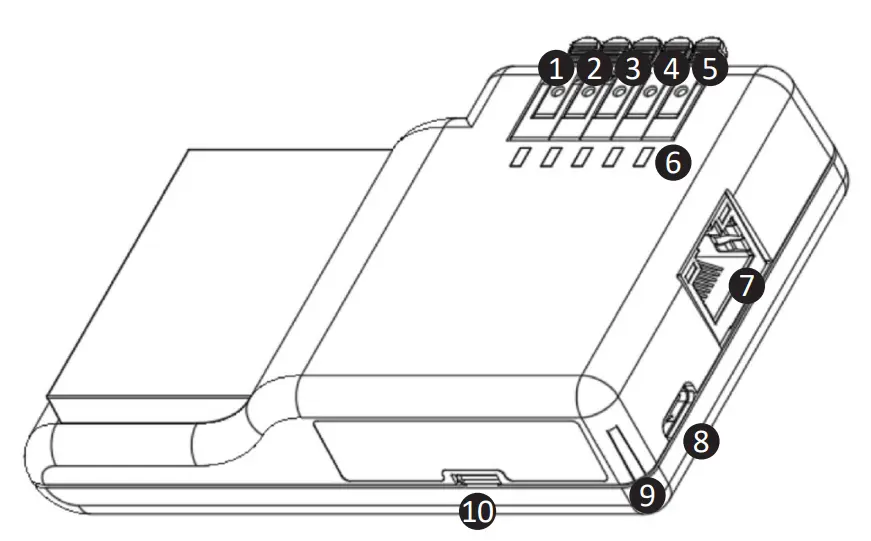
/LED | Function |
|---|---|
| 1 | RS485 A |
| 2 | RS485 B |
| 3 | Ground |
| 4 | S0+ |
| 5 | S0- |
| 6 | Status LEDs 1–5 |
| 7 | RJ-45 connector for Ethernet cables |
| 8 | USB-C |
| 9 | Power LED |
| 10 | Micro-USB |
LEDs
Power LED
| Indicator | Status |
|---|---|
| Off | Off, power supply interrupted |
| Red, steady | Power supply is present |
| orange, flashing | Gateway is booting up |
| Green, steady | Gateway is ready for operation |
Status LED
| Display | Status |
|---|---|
| turquoise, flashing | Software update in progress,
|
| red, flashing light | Cloud connection interrupted |
| purple, flashing light | Internet connection interrupted
|
orange, flashing (during normal operation) | Error occurred
|
Red, flashing (during normal operation) | A serious error has occurred |
Manager rail
Note: The RS-485 1/2, Digital Out D1-D6, and CAN interfaces are currently not functional (as of 12/2024).
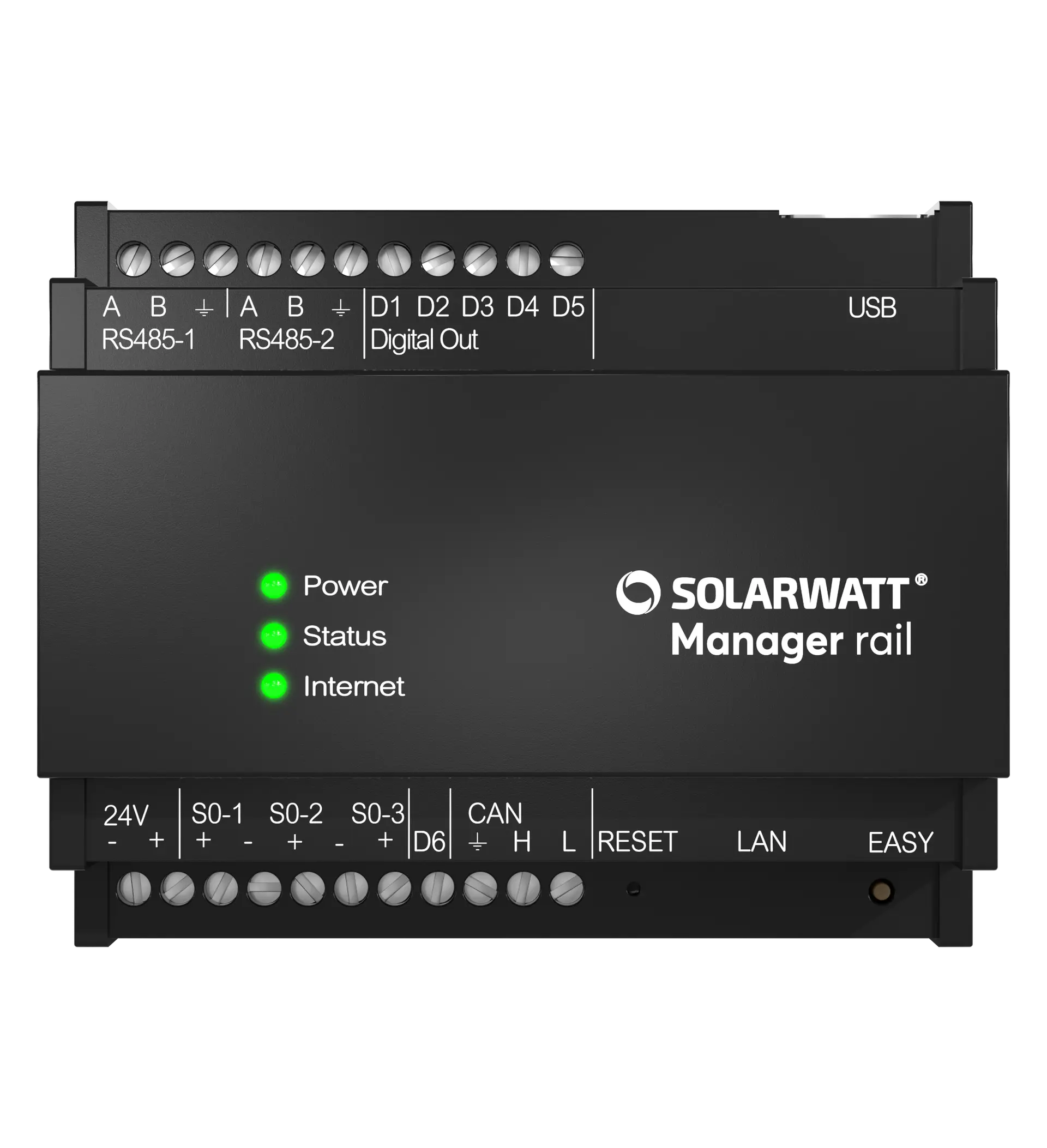
Interfaces
/LED Interface | Function |
|---|---|
| RS-485 1 (A/B/Ground) | See compatibility list |
| RS-485 2 (A/B/Ground) | See compatibility list |
| Digital Out (D1–D5) | No function |
| USB | See compatibility list |
| 24 V DC | power supply |
| S0-1 (+/-) | S0 Meter 1 Connection |
| S0-2 (+/-) | S0 meter 2 connection |
| S0-3 (+/-) | S0 Meter 3 Connection |
| Digital Out (D6) | No function Caution: Do not assign a function to this interface. Otherwise, malfunctions may occur. |
| CAN | No function |
| LAN | RJ-45 Connector for Ethernet cable |
LEDs
Power LED
| Indicator | Status |
|---|---|
| Off | Off, power supply interrupted |
| Red, steady | Power supply is present |
| orange, flashing | Gateway is booting up |
| Green, steady | Gateway is ready for operation |
Status LED
| Display | Status |
|---|---|
| turquoise, steady | Software update in progress; do not disconnect the device from the power supply or Internet connection |
Buttons
| Button | Function |
|---|---|
| Reset | No function |
| Easy | No function |
Manager flex 1.0
Interfaces
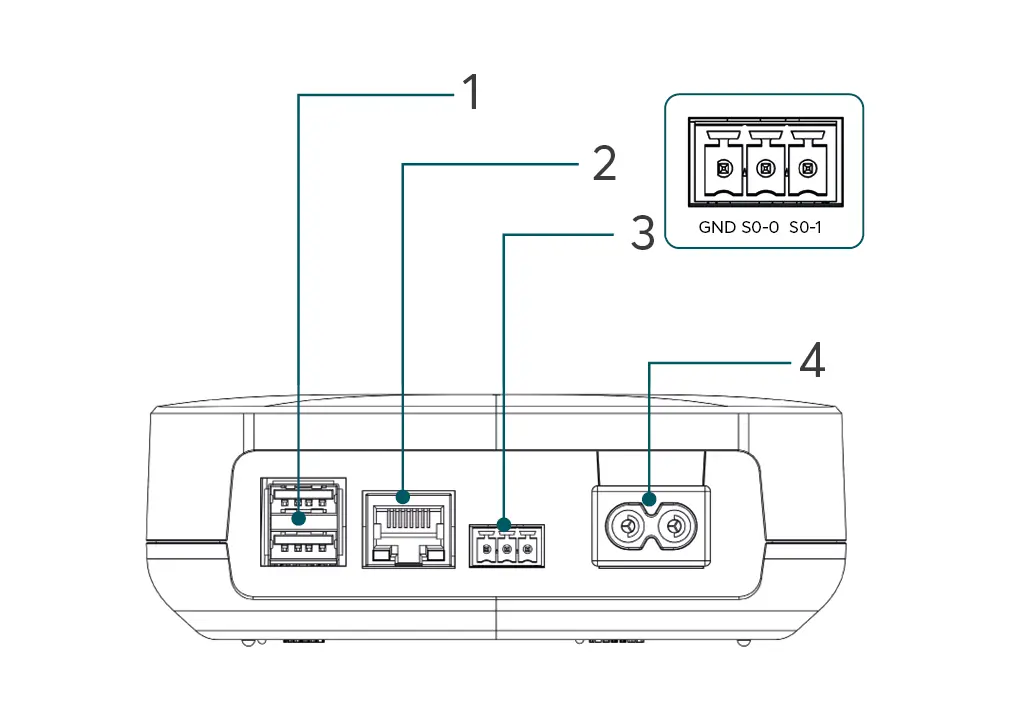
| Interface | Function |
|---|---|
| USB ports | No function |
| Network connection | Ethernet cable connection |
| S0 interface | S0 Meter 1 Connection |
| Power connection | Power supply via included power cord |
LEDs
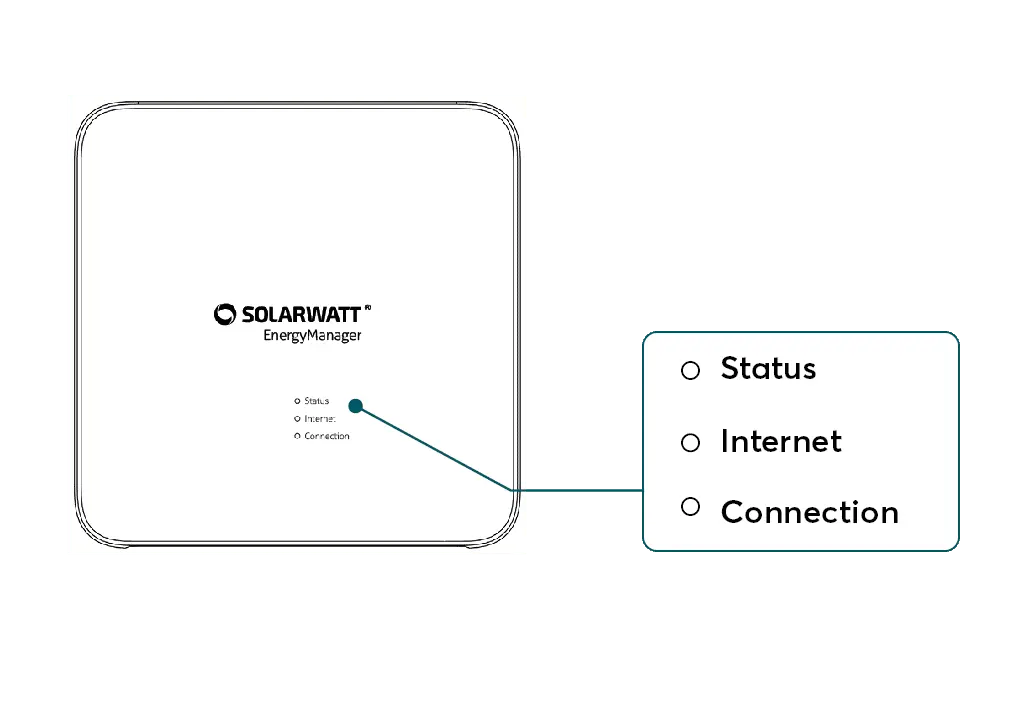
Status LED
| Display | Function | Status |
|---|---|---|
| Self-test | OK |
| Updating firmware | in progress |
| Self-test | Error |
| Booting | is running |
| Cannot start | Serious error |
Internet LED
| Display | Function | Status |
|---|---|---|
| Cloud connection SOLARWATT Manager portal | OK |
| Cloud connection Connection to the router | Disconnected OK |
| Connection to the router (Internet gateway) | Disconnected |
Connection LED
| Indicator | Function | Status |
|---|---|---|
| PLC Connection | Connection established |
Establishing a PLC connection: Commissioning and network connection for SOLARWATT Manager
Button Functions
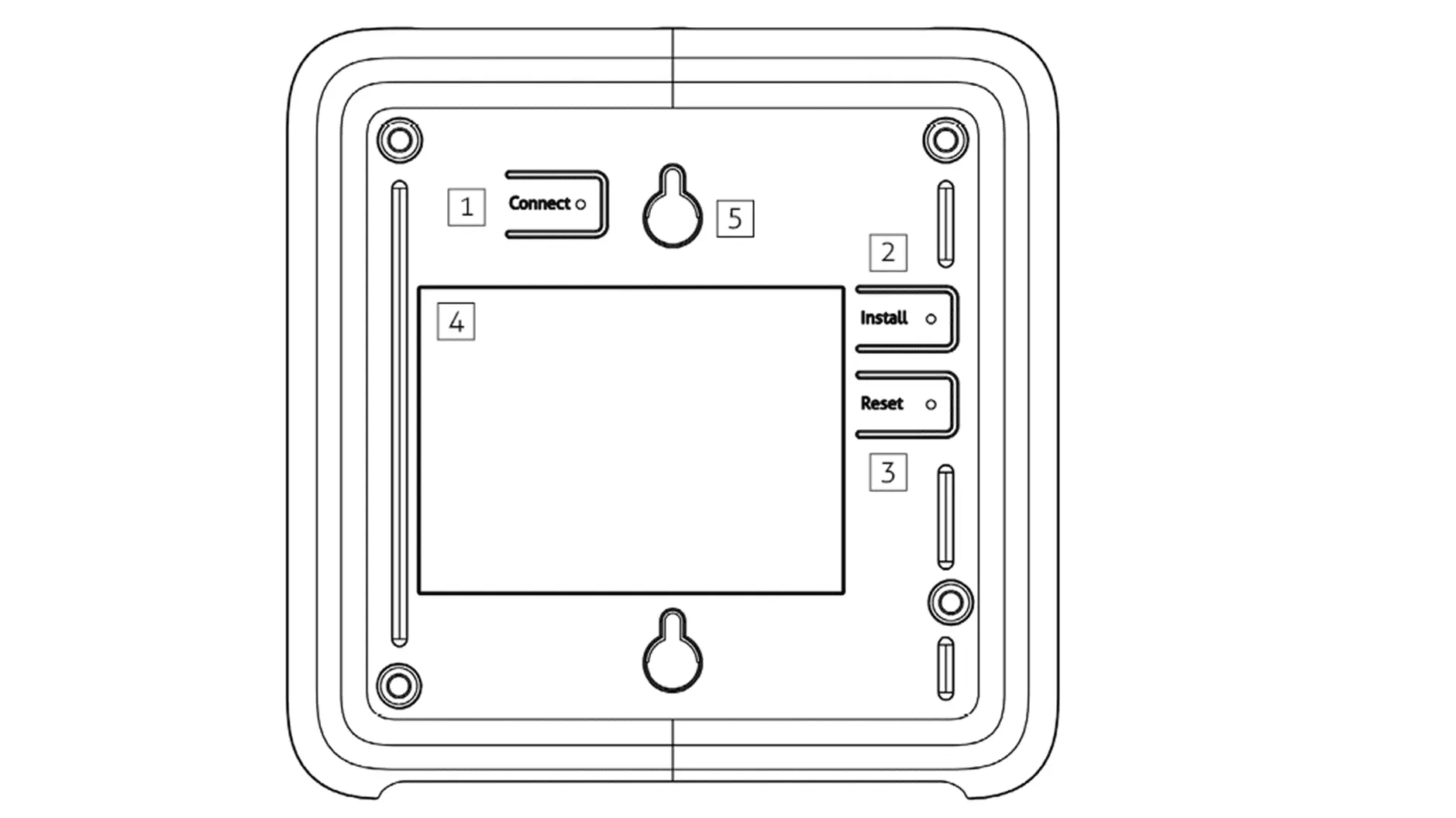
Rear view of the SOLARWATT Manager flex
| Button | Description | |
|---|---|---|
| 1 | Connect | Reset network settings |
| 2 | Install | Establishing a PLC Connection (Data Connection via the Power Grid) |
| 3 | Reset | Restore Factory Settings |
| 4 | (nameplate) | |
| 5 | (mounting bracket) | |
Resetting the SOLARWATT Manager flex
| Button function | Press and hold | Function |
|---|---|---|
| Install | 6 sec | Soft Reset Local network settings are reset. PLC encryption is retained. |
| Reset + Install | 5 sec | Reset to Factory Settings Local network settings are reset. Devices and their configurations are deleted from the device. The link between SOLARWATT Manager flex and the user account is deleted. The user account and historical data in the SOLARWATT Manager portal are retained. Perform this only when an Internet connection is active; otherwise, setup problems may occur. |
Overview of Button Functions for Powerline Communication (PLC)
| Button Function | Press Duration | Function |
|---|---|---|
| Install | 3 sec* | Enable/disable PLC module** |
| Connect | 6 sec | PLC connection mode Must be activated in encrypted PLC networks. |
| 1 sec | PLC Key Exchange Must be activated in encrypted PLC networks. | |
| 10 sec | PLC Reset PLC encryption is reset and connections are lost. |
*) If the button is held down for an extended period, the Manager may reset
**) The PLC module is disabled by default. Caution: Risk of a short circuit in the local network.
Setting Up a PLC Connection: Commissioning and Network Connection for the SOLARWATT Manager
EnergyManager Pro
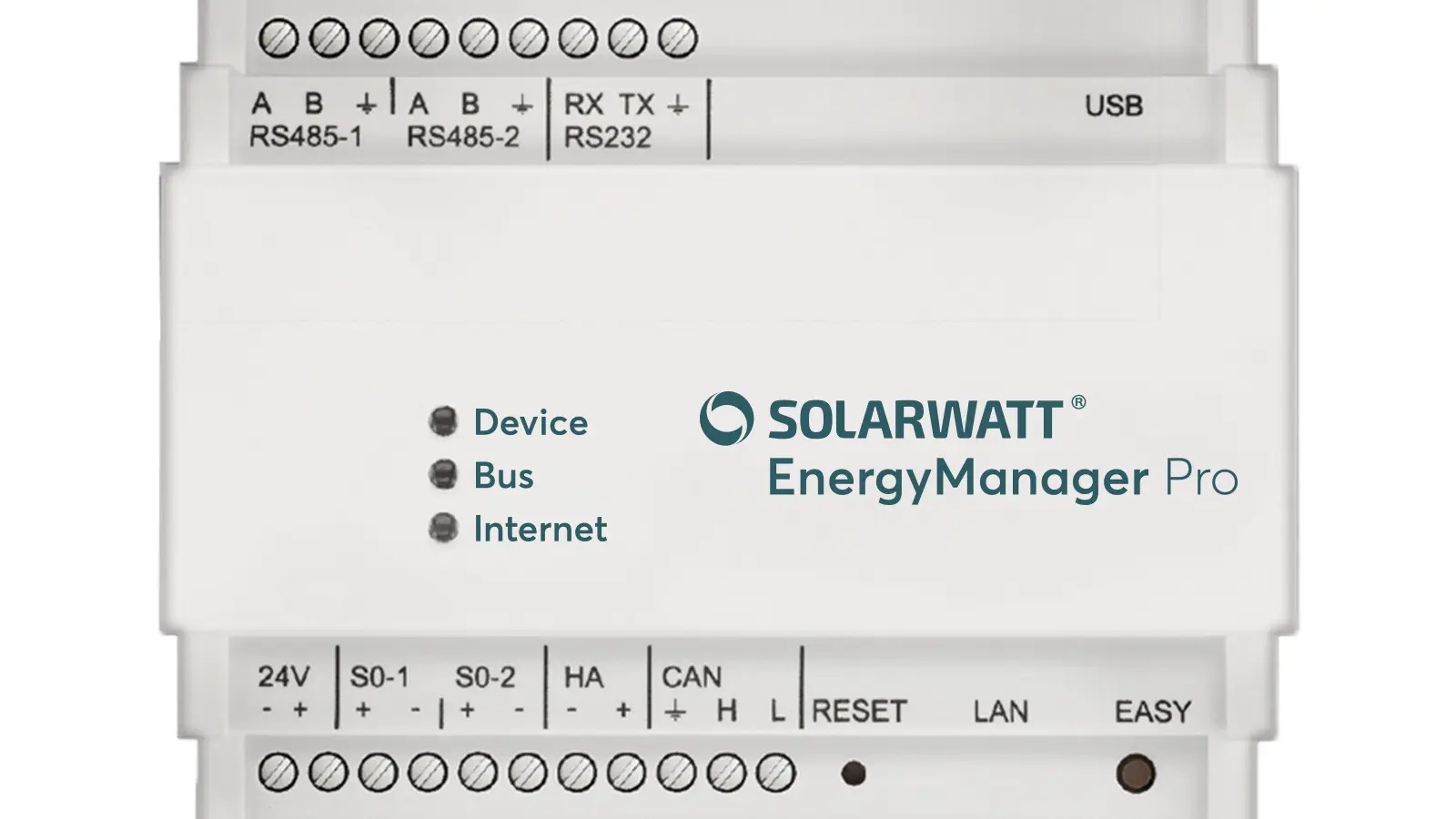
Interfaces
| Interface | Function |
|---|---|
| RS-485 1 (A/B/Ground) | Connection: Inverter / Energy Meter |
| RS-485 2 (A/B/Ground) | Connection to inverter / energy meters |
| RS-232 2 (RX/TX/Ground) | No function |
| USB | No function |
| 24 V DC | power supply |
| S0-1 (+/-) | S0 Meter 1 Connection |
| S0-2 (+/-) | S0 connection for meter 2 |
| HA | No function |
| CAN | Connection ACS, for ACS Solo setup |
| LAN | RJ-45 Ethernet cable connection |
LED Codes
| Status | Device | Bus | Internet |
|---|---|---|---|
| Off | No power supply | No extension connected | - |
| Green | Gateway (Energy Manager) active | Extension connected | Active, Internet connection available |
| Green, flashing (1 Hz, slow) | Booting or searching for devices | - | Booting |
| Green, flashing (10 Hz, fast) | Update process | - | - |
| Orange | - | - | Gateway (Energy Manager) was manually set to the maintenance IP; this can only be undone by restarting |
| Red | No device found or installation failed Repeat the process. If the problem persists, consult the online documentation or contact support. | Problem on the extension bus Consult the online documentation or contact support. | No Internet connection |
Interfaces for operation
| Reset | RESET button (restarts the EnergyManager) |
|---|---|
| Status | DEVICE LED (Indicates general operation and a device search) |
| Internet Connectivity | INTERNET LED (Indicates whether there is a connection to the SOLARWATT Manager portal) |
| Bus | BUS LED (Lights up when the Extension Bus is active) |
| LAN | Connectivity and data transfer indicator for the Ethernet connection |
Selected articles: